OCR, mobile scanning and AI features support document preparation, collaborative review and signature workflows
NEW YORK, NY – November 13, 2026 – Lumin PDF Corporation issued a clarification of its PDF OCR tool for real estate teams evaluating document workflows, distinguishing text recognition within individual documents from unattended processing of an entire archive or folder. The October 28 clarification addresses how teams should assess separate tasks involving deeds, inspection reports and disclosure packets.
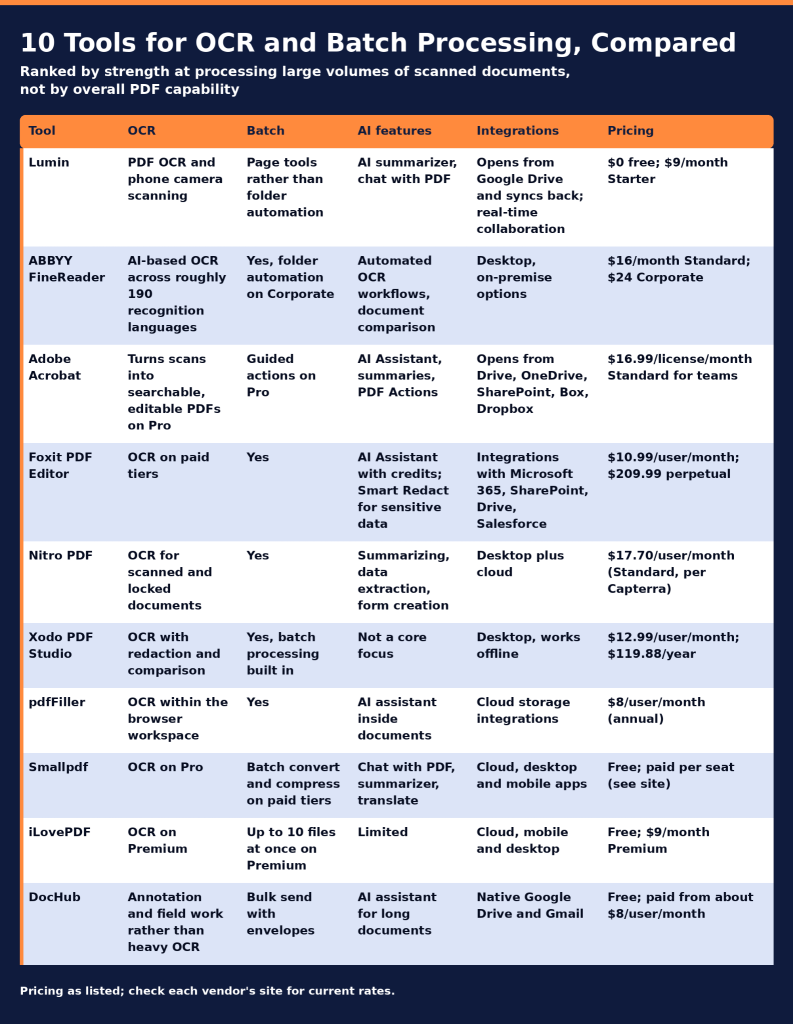
The announcement concerns existing capabilities, not a product launch. It explains the boundaries between document capture, text recognition, collaborative review and signature tracking so teams can identify where individual handling and verification remain necessary.
“Recognizing text is not the same as confirming its accuracy, and organizing a packet is not the same as confirming that its contents are complete,” Lumin PDF Corporation stated in the clarification.
Capture, Text Recognition and Review
Phone camera scanning creates a digital starting point from paper pages. OCR recognizes printed text in scanned documents. Teams can then edit PDF content, annotate pages, merge or split files, and redact sensitive information.
These functions serve distinct purposes. A captured image records a page, while text recognition supports subsequent work with its printed content. Teams should compare the resulting document with the source before using it in transaction paperwork.
Lumin’s document preparation and review functions are also distinct from Lumin Sign’s signature-request functions. Teams assessing a complete workflow should confirm which product supports each task.
Inspection and Disclosure Packet Example
An illustrative workflow shows how the capabilities can fit together:
- Capture paper pages with a phone camera.
- Apply OCR to recognize printed text in a scanned document.
- Compare the recognized text with the source pages before making edits.
- Annotate items requiring review, organize pages and redact sensitive information.
- Check the assembled documents before preparing a signature request.
This sequence is an example, not a customer case study, a measured performance result or an automatically executed process.
AI Review and Google Drive
AI summaries and document chat provide additional ways to review document content. Their outputs should be checked against the underlying documents before use in transaction paperwork; they do not replace review of relevant source pages.
For teams working in Google Drive, files can be opened in Lumin and synced back to the original. Collaborative editing and annotation support team review within the workspace.
Signature Tracking and Access Requirements
Lumin Sign supports signature packets with status tracking, due dates, automated reminders and certificates of completion. These functions address signature requests and progress monitoring after document preparation.
The clarification does not establish plan-level entitlements or availability across every platform. Before adopting a workflow, teams should confirm applicable plans, platform requirements and access to each product needed for their intended tasks.
Product information is available at luminpdf.com. Questions about feature access and workflow requirements can be directed to the company using the contact information below.
About Lumin PDF Corporation
Lumin PDF Corporation develops cloud-based tools for PDF editing, document collaboration and electronic signatures. Its products include OCR, mobile scanning, AI summaries, document chat, annotation and page organization capabilities. Lumin Sign supports signature requests, progress tracking, reminders and certificates of completion.
Media Contact
Media Relations
Lumin PDF Corporation
Email: support@luminpdf.com
Website: https://www.luminpdf.com