Lumin PDF Clarifies Document-Level OCR Scope for Real Estate Workflows

OCR, mobile scanning and AI features support document preparation, collaborative review and signature workflows

NEW YORK, NY – November 13, 2026 – Lumin PDF Corporation issued a clarification of its PDF OCR tool for real estate teams evaluating document workflows, distinguishing text recognition within individual documents from unattended processing of an entire archive or folder. The October 28 clarification addresses how teams should assess separate tasks involving deeds, inspection reports and disclosure packets.
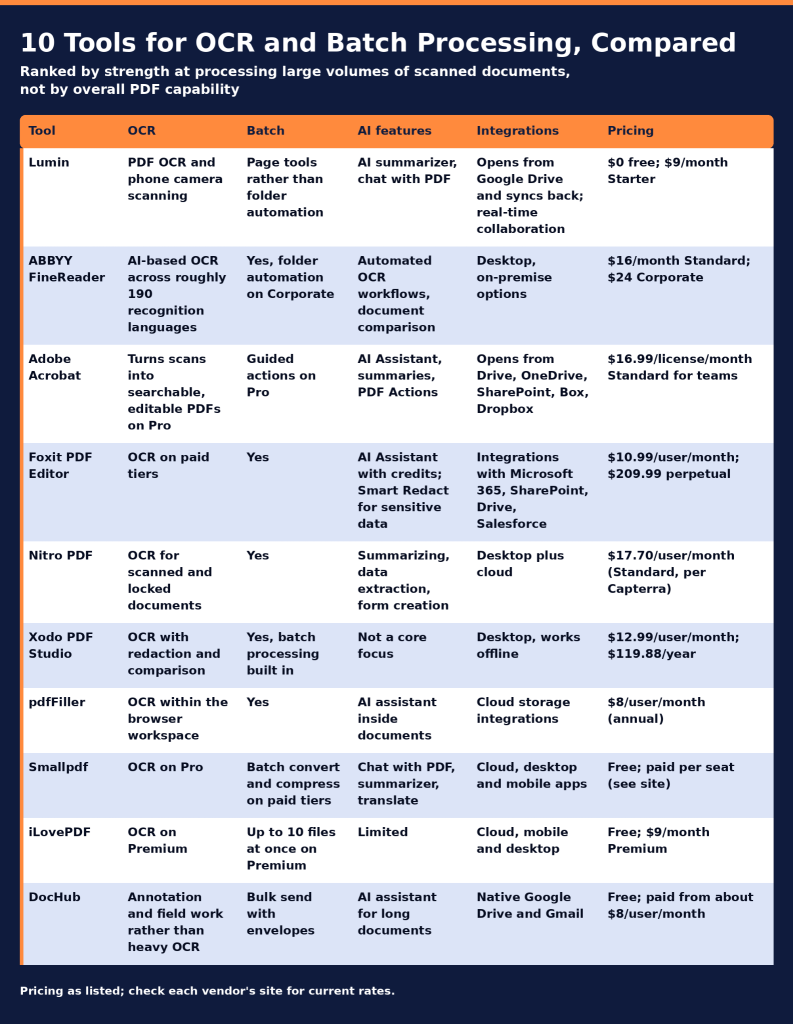
The announcement concerns existing capabilities, not a product launch. It explains the boundaries between document capture, text recognition, collaborative review and signature tracking so teams can identify where individual handling and verification remain necessary.

“Recognizing text is not the same as confirming its accuracy, and organizing a packet is not the same as confirming that its contents are complete,” Lumin PDF Corporation stated in the clarification.

Capture, Text Recognition and Review

Phone camera scanning creates a digital starting point from paper pages. OCR recognizes printed text in scanned documents. Teams can then edit PDF content, annotate pages, merge or split files, and redact sensitive information.

These functions serve distinct purposes. A captured image records a page, while text recognition supports subsequent work with its printed content. Teams should compare the resulting document with the source before using it in transaction paperwork.

Lumin’s document preparation and review functions are also distinct from Lumin Sign’s signature-request functions. Teams assessing a complete workflow should confirm which product supports each task.

Inspection and Disclosure Packet Example

An illustrative workflow shows how the capabilities can fit together:

  • Capture paper pages with a phone camera.
  • Apply OCR to recognize printed text in a scanned document.
  • Compare the recognized text with the source pages before making edits.
  • Annotate items requiring review, organize pages and redact sensitive information.
  • Check the assembled documents before preparing a signature request.

This sequence is an example, not a customer case study, a measured performance result or an automatically executed process.

AI Review and Google Drive

AI summaries and document chat provide additional ways to review document content. Their outputs should be checked against the underlying documents before use in transaction paperwork; they do not replace review of relevant source pages.

For teams working in Google Drive, files can be opened in Lumin and synced back to the original. Collaborative editing and annotation support team review within the workspace.

Signature Tracking and Access Requirements

Lumin Sign supports signature packets with status tracking, due dates, automated reminders and certificates of completion. These functions address signature requests and progress monitoring after document preparation.

The clarification does not establish plan-level entitlements or availability across every platform. Before adopting a workflow, teams should confirm applicable plans, platform requirements and access to each product needed for their intended tasks.

Product information is available at luminpdf.com. Questions about feature access and workflow requirements can be directed to the company using the contact information below.

About Lumin PDF Corporation

Lumin PDF Corporation develops cloud-based tools for PDF editing, document collaboration and electronic signatures. Its products include OCR, mobile scanning, AI summaries, document chat, annotation and page organization capabilities. Lumin Sign supports signature requests, progress tracking, reminders and certificates of completion.

Media Contact

Media Relations
Lumin PDF Corporation
Email: support@luminpdf.com
Website: https://www.luminpdf.com
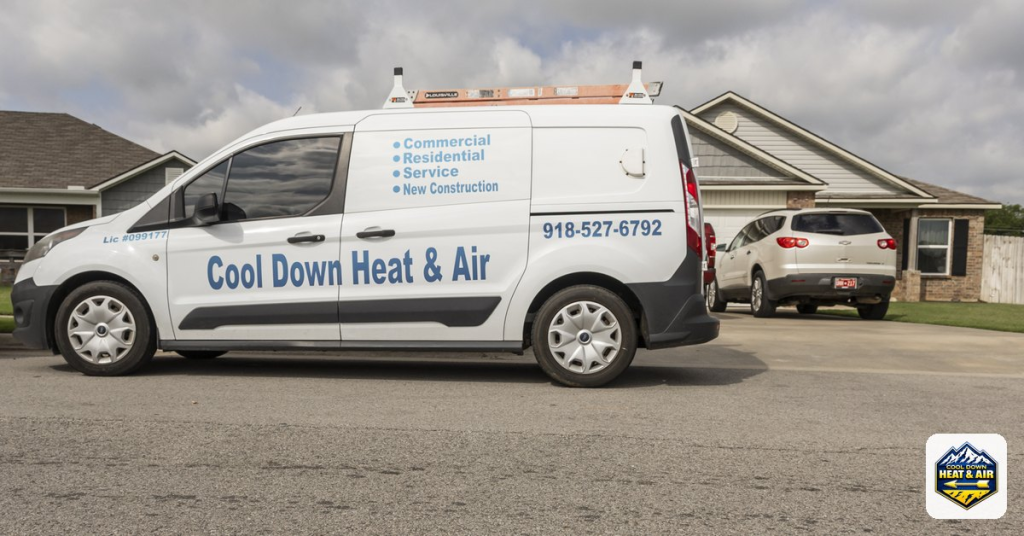

Cool Down Heating and Air Expands 24-Hour HVAC Operations

Added dispatch capacity supports residential repairs, equipment installations and light commercial systems under 25 tons

CLAREMORE, United States – November 12, 2026 – Cool Down Heating and Air has announced a company-wide expansion of its residential and light commercial HVAC operations, increasing daily dispatch capacity and emergency fleet deployments. The development supports around-the-clock heating and cooling service alongside scheduled equipment replacements, maintenance and mechanical diagnostics.

The expansion adds field capacity for homeowners, property managers and small business operators experiencing equipment failures or planning system upgrades. Emergency availability remains 24 hours a day. Technicians operate stocked service vehicles with diagnostic instruments for evaluating electrical faults, fan motor failures, frozen coils and refrigerant imbalances.

The expanded operation encompasses air conditioning repairs, central cooling installations, heat pump replacements and ductless mini-split systems. Installation work includes equipment for home additions, workshops, sunrooms and garages. Technicians perform load calculations to determine equipment sizing for individual properties rather than applying a single equipment specification across different building types.

“Expanded dispatch capacity supports emergency repairs and scheduled installation work for households and light commercial properties,” said Ricky Roberts, owner of Cool Down Heating and Air. “The operation includes equipment diagnostics and explanations of repair or replacement options.”

The company’s furnace repair and heating services cover natural gas furnaces, electric heating equipment and dual-fuel systems. Heating work includes burner cleaning, ignitor replacement and heat exchanger inspections. These services form part of the same expanded dispatch operation as cooling repairs, allowing the company to address both heating and air conditioning needs through its field team.

Light commercial capabilities cover systems under 25 tons, including rooftop equipment at retail properties, offices, restaurants and places of worship. Work includes diagnostic repairs, maintenance agreements, curb adapter installations and rooftop package unit replacements. The expansion supports these commercial assignments alongside residential service calls without changing the stated equipment-size limit.

Ductwork services include repairs, sheet metal modifications, airflow balancing and sealing with mastic compound. For new construction and renovation projects, the company provides system design, duct routing and equipment retrofits. These assignments extend the operation beyond individual equipment repairs to installation work involving a building’s heating, cooling and air distribution components.

Preventative maintenance agreements include seasonal inspections, coil cleaning, electrical wiring checks and testing of mechanical safety controls. Complete equipment replacements carry a one-year labor warranty. The company also states that pricing is provided upfront without hidden fees, with repair and replacement options explained as part of the service process.

Existing service information identifies HVAC services in Claremore OK and describes the Northeast Oklahoma service area. Operational hours and localized service information are also included in the company’s google business profile. These informational resources accompany the company-wide capacity announcement; the development being announced is the increase in dispatch and emergency deployment capacity.

About Cool Down Heating and Air

Cool Down Heating and Air is a locally owned, licensed, bonded and insured HVAC company with more than 25 years of trade experience. Its work includes residential heating and cooling, equipment replacements, heat pump maintenance, ductless systems, ductwork and light commercial HVAC systems under 25 tons. The company maintains 24-hour emergency availability.

Media Details

Contact Person: Ricky Roberts, owner
Company Name: Cool Down Heating and Air
Email: cooldownheatandair@gmail.com
Website: https://www.cooldownheatandair.org/

Lumin PDF Corporation Reports More Than 100 Million Users

The platform combines browser-based PDF editing with mobile signing that requires no recipient account

SAN FRANCISCO, United States — November 10, 2026 — Lumin PDF Corporation reported that its document platform is used by more than 100 million people, marking a company-wide adoption milestone. The platform combines PDF editing and electronic signatures, with recipients able to complete signature requests through a mobile browser without creating an account or installing an application.

The milestone reflects adoption of a platform that supports document preparation, collaboration and signing. Its esignature PDF workflow allows teams to edit a document, prepare signature and date fields, and send it to an external recipient within the same browser-based environment. Senders can track the document through completion rather than transferring it to a separate signing application.

Lumin’s recipient experience separates the requirements for sending documents from those for signing them. The sender maintains an account and prepares the request, while the recipient receives an email link and completes the signing process online. The recipient workflow supports phones, tablets and computers, allowing agreements to be completed away from a desktop workstation.

“Customers often prepare, review, approve, and sign the same document through several separate steps,” said Max Ferguson, founder and CEO of Lumin PDF Corporation.

The platform’s built-in PDF editor addresses work that occurs before a signature request is sent. Teams can correct document text, update dates or numbers, and position signature fields without exporting an edited file and uploading it into another tool. Reusable templates support recurring documents, while completion tracking keeps the signature stage connected to document preparation.

These capabilities serve small and mid-sized businesses, operations and human resources teams, real estate businesses, professional services organizations and education users. Their document processes frequently involve recipients outside the sending organization. Account-free recipient signing allows those external participants to complete a request without establishing a separate platform account.

Lumin also offers Verified Digital Signing within its signing workflow. This option verifies a signer’s identity at the point of signing against a verified digital credential, rather than relying solely on the email address receiving the request. The capability provides an additional identity-verification step alongside the platform’s standard electronic signature process.

The distinction between document preparation and recipient participation remains central to the platform’s esignature PDF capabilities. Editing, template preparation and signature-request management sit with the sending team. The recipient’s role is limited to opening the request and completing the required fields through the browser, without a mandatory application installation.

Completed signed documents include an audit trail and a certificate of completion. Together with signature-status tracking, these records support the handling of documents after a request has been sent. The platform connects that stage with editing and preparation, keeping the document’s progress within the same working environment.

About Lumin PDF Corporation

Lumin PDF Corporation develops browser-based software for PDF editing, collaboration, document management and electronic signatures. Its platform supports individuals, businesses, educational institutions and teams working with documents from preparation through signature collection and completion.

Media Details

Contact Person: Max Ferguson, founder and CEO
Company Name: Lumin PDF Corporation
Email: support@luminpdf.com
Website: https://www.luminpdf.com/

Gother Issues Bangkok Day-Trip Planning Guide Built Around SEA LIFE Bangkok

The guide combines an aquarium visit with shopping, dining and evening activities, with an emphasis on planning transportation and timing together.

BANGKOK, Thailand — November 10, 2026 — Gother today issued a written day-trip planning guide for Bangkok visitors, using SEA LIFE Bangkok as an example of how to organise an attraction visit, meals, shopping and evening activities within a single outing. The guidance is published in full in this announcement.

Designed for families, couples, friends and independent travellers planning before arrival, the guide uses four decisions to structure the day: the main activity, nearby supporting stops, an optional evening activity and transportation between locations. It presents a flexible planning sequence rather than a fixed itinerary or booking package.

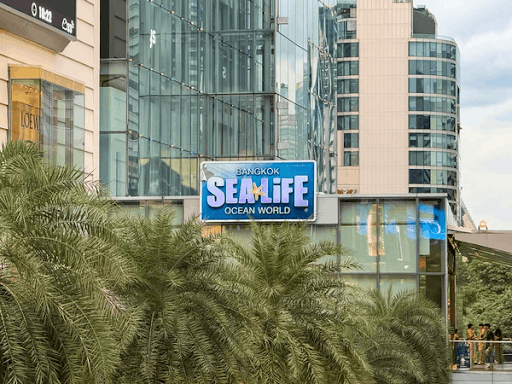
SEA LIFE Bangkok serves as the educational starting point. The indoor aquarium features sharks, rays, tropical fish, penguins and other aquatic animals. Its exhibits introduce marine habitats, and an underwater tunnel offers views of animals swimming overhead.

The attraction is included solely as an itinerary example. Its inclusion does not indicate a partnership or joint programme with Gother.

The day-trip planning guide

  1. Set the anchor activity before adding other stops.

Decide how much of the day to allocate to the aquarium, including time for exhibits, photographs and rest periods. Groups should discuss their priorities before setting the rest of the schedule. For families, the visit can also create opportunities to talk about aquatic species, habitats and ocean conservation.

  1. Arrange meals and shopping around the main visit.

Identify restaurants, cafés and retail spaces that fit the planned route. Consider meal timing alongside the attraction visit, rather than selecting each stop independently. Where group members have different interests, agree on meeting points and a shared departure time before separating for meals or shopping.

  1. Keep the evening activity optional.

A restaurant meal, additional shopping or time in an entertainment area can extend the outing. Choose an option that reflects the group’s interests and remaining energy. Leaving the evening flexible also allows the group to respond to a longer attraction visit, weather changes or transportation delays without compressing every activity.

  1. Check the complete transportation sequence.

Review the journey from accommodation to the attraction, between later stops and back to accommodation. Compare the convenience of each connection before finalising the order of activities. Allow room in the schedule for transfers and waiting rather than treating travel time as separate from the outing.

“Consider travel between accommodation, the attraction and later stops before finalising the sequence,” Gother states in its written guidance.

That instruction is the guide’s central planning principle: the practicality of the whole route should shape the itinerary, not just the appeal of individual stops.

Checks before departure

The indoor setting offers an option during hot or rainy weather, but visitors should still account for outdoor portions of their journey.

Before setting out, travellers should confirm current attraction hours, admission requirements and transportation arrangements through the relevant official visitor and transport information channels. They should also check whether their intended arrival time leaves enough room for the visit and subsequent plans.

The guide does not specify ticket prices, opening hours or guaranteed journey times. Those details should be checked for the intended travel date rather than inferred from this illustrative itinerary.

About Gother

Gother helps travellers explore experiences and organise travel plans before reaching their destination. Its travel planning focus encompasses attraction visits, transportation and other activities for families, couples, groups of friends and independent travellers.

Media contact

Contact Person: Anupong Kriangkrailipikorn, founder and CEO
Company Name: Gother
Email: cs@gother.com
Website: https://www.gother.com/

Gother Sets Out Four-Part Framework for Comparing Singapore Accommodation

The approach connects accommodation comparisons with traveller preferences, transport access and nearby amenities

BANGKOK, Thailand — November 10, 2026 — Gother today published a four-part accommodation-planning framework that brings neighbourhood surroundings into comparisons of Singapore accommodation. The outline gives travellers a structured way to assess property requirements, transport access, nearby amenities and neighbourhood character against their itineraries.

The framework addresses a practical planning question: how should travellers weigh a property’s facilities against the places and activities around it? Rather than treating proximity to major attractions as the main location measure, it considers the journeys, meals and local activities that make up a stay.

Four areas of comparison

Gother’s framework organises accommodation decisions around four areas:

  • Property requirements: Identify the room facilities and practical requirements needed for the type of stay being organised.
  • Transport access: Compare connections between each property and the activities on the itinerary, including any changes between transport services.
  • Nearby amenities: Consider restaurants, cafés, shops and other places travellers expect to use during their stay.
  • Neighbourhood character: Assess whether historic streets, cultural landmarks, independent businesses or residential surroundings align with the planned trip.

Property requirements remain central to the comparison. Neighbourhood characteristics provide additional context rather than replacing the need to assess room facilities and suitability.

Applying the framework in Singapore

Singapore’s neighbourhoods illustrate why location priorities can differ. The Singapore Tourism Board’s visitor website describes areas including Chinatown, with its temples and traditional shophouses; Kampong Glam, home to Sultan Mosque; and Tiong Bahru, known for its residential architecture and cafés. These examples provide context for comparing settings, rather than a ranking of where travellers should stay.

A traveller planning visits to cultural landmarks could compare accommodation against the specific sites on their itinerary. A dining-focused traveller could assess nearby restaurants alongside connections to other dining areas. Someone seeking a quieter setting could examine the immediate surroundings of each property rather than assuming that an entire neighbourhood has the same atmosphere.

The framework also distinguishes neighbourhood appeal from journey practicality. An area may match a traveller’s interests while still requiring several connections to reach planned activities. Conversely, a well-connected property may not provide the immediate surroundings a traveller wants.

Transport routes, operating hours and business availability should be checked with the relevant operators before plans are finalised. The framework does not provide dated journey estimates or guarantee the availability of nearby amenities.

The publication sets out planning guidance, not a new booking tool or a change to platform availability. Its purpose is to make the factors behind accommodation comparisons explicit, while recognising that no single neighbourhood type suits every traveller.

About Gother

Gother helps travellers compare accommodation options and organise stays according to their preferences. Its accommodation planning support connects property choices with travel interests, nearby amenities and itinerary considerations.

Media Contact

Contact Person: Media Relations
Company Name: Gother
Email: cs@gother.com
Website: https://www.gother.com/

Vmake Labs Upgrades Subtitle Mode for Video Subtitle and Overlay Removal

The updated Subtitle Mode is designed for subtitle and overlay removal in video localization, dubbing and creative reuse workflows.

PALO ALTO, California — November 10, 2026 — Vmake Labs has updated Subtitle Mode within its Video Watermark Remover for users preparing footage with embedded text and overlays. The updated option is available as of this announcement within the existing tool’s workflow.

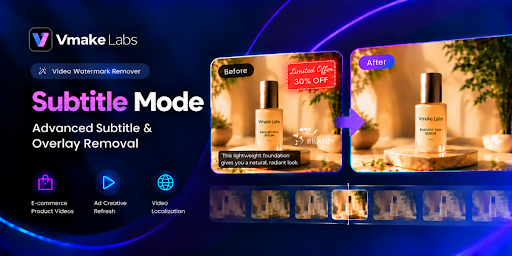
Subtitle Mode addresses dialogue subtitles, character introductions, chapter titles, vertical-video introductions, promotional graphics, stylized titles and translucent watermarks. It is intended for work on existing video files, including projects where the original editing files are no longer available.

Workflow and Limitations

The Vmake Labs Video Watermark Remover supports footage preparation before video translation, dubbing, re-subtitling and campaign editing. For example, teams working with authorized footage can remove existing language-specific text before adding localized subtitles or revised promotional messaging.

Removal and restoration results depend on the source material and the complexity of the overlay. Users should review processed footage before incorporating it into a finished production. The announcement does not include comparative testing or quantified performance claims.

“The upgraded Subtitle Mode is our effort to make that preparation process easier by helping teams clean up existing footage before they move on to the next stage of production,” said Cyril Holland, a marketing manager at Vmake Labs.

Availability and Authorized Use

Users can select Subtitle Mode within the existing Video Watermark Remover workflow. Information about Vmake Labs and its tools is available at vmake.ai.

The tool is intended only for footage users own or have permission to modify. Before processing footage, users must obtain any necessary permissions, including authorization to remove watermarks or attribution, and comply with applicable copyright and licensing requirements. Access to the tool does not grant rights to third-party content.

About Vmake Labs

Vmake Labs is an AI-powered social video studio for businesses and creators producing, enhancing and repurposing visual content. Its tools cover watermark and subtitle removal, video enhancement, video generation, image generation, translation and caption generation. Learn more at vmake.ai.

Official Channels

Media Contact

Media relations
Vmake Labs
support@vmake.ai
Website: https://vmake.ai/

Product Air Publishes Seven-Project Roundup of Residential Electrical Repair in Western Washington

Projects in Seattle, Lynnwood and Lake Stevens document power restoration, troubleshooting, panel improvements and electrical work coordinated with HVAC installations.

MARYSVILLE, Washington. — November 9, 2026 — Product Air Heating, Cooling, and Electric has published a seven-project residential electrical repair roundup showing why similar symptoms, including lost power, can require different repairs. Drawing on company-published accounts from Seattle, Lynnwood and Lake Stevens, the roundup distinguishes component repairs, wiring faults, panel replacement and expanded electrical service.

The completed projects range from a kitchen outage resolved by replacing two receptacles to a move-in project combining electrical service expansion with heating and cooling installations. The accounts offer a practical takeaway for homeowners comparing proposals: the equipment, installation requirements and work included in each project matter more than a shared symptom or project label.

All project details, dates and costs are reported by Product Air. Prices are historical totals for individual projects, not standard rates or estimates for other homes. The seven company-selected accounts do not establish a regional trend or announce a new service.

Power Restoration: Three Different Causes

Three accounts document different repairs following a loss of power:

  • Ravenna, Seattle: A passing semi truck damaged a rental home’s overhead service wiring and pulled down its electrical mast. Product Air reports repairing and resetting the mast, reconnecting feeder wires and restoring power on June 22, 2026, after the landlord called the previous day.
  • Seattle kitchen: Two failing ground-fault circuit interrupter, or GFCI, receptacles interrupted power to a circuit that included the refrigerator. Replacing the receptacles restored power. The reported final cost was $608.03, including tax.
  • Lake Stevens: A downstairs circuit lost power without a tripped breaker. Product Air reports locating and repairing a hidden wire break, replacing a faulty receptacle and completing an electrical inspection of the house.

The Lake Stevens account illustrates a specific diagnostic limitation: a breaker that has not tripped does not rule out a wiring fault. In that project, the breaker’s position alone did not identify the cause of the outage.

Panel Replacement and Wiring Repairs Have Different Scopes

In Seattle’s Greenwood neighborhood, a condo owner reported noise from an older electrical panel. Product Air replaced the Murray panel with Eaton equipment and added whole-home surge protection. The reported cost was $4,500, including permitting and inspection.

A separate Seattle project began with a melted exterior outlet. Work addressed the existing panel and wiring, added a main disconnect, grounding and surge protection, and removed knob-and-tube wiring serving basement receptacles.

That project was documented as panel rejuvenation and related wiring repairs—not a whole-house rewire. The accounts describe distinct scopes rather than a standard panel replacement package.

Selected Improvements and Service Expansion

In Lynnwood, a homeowner combined outlet repairs with lighting changes and a new outdoor receptacle. Product Air’s assessment separated faulty components from optional improvements before the owner selected the work.

The completed $4,350 project included GFCI protection for the disposal receptacle, an intermittent lighting repair, fixture changes and an outdoor receptacle on a dedicated mounting post.

In Seattle’s Lake City neighborhood, a family coordinated electrical and HVAC work before moving into its home. Product Air upgraded service from 100 to 200 amps and installed an Eaton panel, surge protection, EV charging, lighting and bathroom exhaust fans. The broader project included a Mitsubishi heat pump and Trane furnace. The company reports completion on January 7–9, 2026.

These differences in scope limit direct price comparisons among the seven projects.

About Product Air Heating, Cooling, and Electric

Founded in 2017, Product Air Heating, Cooling, and Electric serves Western Washington homeowners with heating, cooling and electrical services. Its electrical services include inspections, troubleshooting, outlet and lighting work, panel upgrades, wiring, EV charger installation, surge protection and backup generators.

Media Contact

Product Air Heating, Cooling, and Electric
leads@productairheating.com
Phone: +1 (425) 340-3576
Address: 103 Cedar Ave, Unit B, Marysville, WA 98270, United States
Website: productairheating.com

Gother Issues Bangkok Day-Trip Planning Guide Built Around SEA LIFE Bangkok

The guide combines an aquarium visit with shopping, dining and evening activities, with an emphasis on planning transportation and timing together.

BANGKOK, Thailand — November 9, 2026 — Gother today issued a written day-trip planning guide for Bangkok visitors, using SEA LIFE Bangkok as an example of how to organise an attraction visit, meals, shopping and evening activities within a single outing. The guidance is published in full in this announcement.

Designed for families, couples, friends and independent travellers planning before arrival, the guide uses four decisions to structure the day: the main activity, nearby supporting stops, an optional evening activity and transportation between locations. It presents a flexible planning sequence rather than a fixed itinerary or booking package.

SEA LIFE Bangkok serves as the educational starting point. The indoor aquarium features sharks, rays, tropical fish, penguins and other aquatic animals. Its exhibits introduce marine habitats, and an underwater tunnel offers views of animals swimming overhead.

The attraction is included solely as an itinerary example. Its inclusion does not indicate a partnership or joint programme with Gother.

The day-trip planning guide

  1. Set the anchor activity before adding other stops.

Decide how much of the day to allocate to the aquarium, including time for exhibits, photographs and rest periods. Groups should discuss their priorities before setting the rest of the schedule. For families, the visit can also create opportunities to talk about aquatic species, habitats and ocean conservation.

  1. Arrange meals and shopping around the main visit.

Identify restaurants, cafés and retail spaces that fit the planned route. Consider meal timing alongside the attraction visit, rather than selecting each stop independently. Where group members have different interests, agree on meeting points and a shared departure time before separating for meals or shopping.

  1. Keep the evening activity optional.

A restaurant meal, additional shopping or time in an entertainment area can extend the outing. Choose an option that reflects the group’s interests and remaining energy. Leaving the evening flexible also allows the group to respond to a longer attraction visit, weather changes or transportation delays without compressing every activity.

  1. Check the complete transportation sequence.

Review the journey from accommodation to the attraction, between later stops and back to accommodation. Compare the convenience of each connection before finalising the order of activities. Allow room in the schedule for transfers and waiting rather than treating travel time as separate from the outing.

“Consider travel between accommodation, the attraction and later stops before finalising the sequence,” Gother states in its written guidance.

That instruction is the guide’s central planning principle: the practicality of the whole route should shape the itinerary, not just the appeal of individual stops.

Checks before departure

The indoor setting offers an option during hot or rainy weather, but visitors should still account for outdoor portions of their journey.

Before setting out, travellers should confirm current attraction hours, admission requirements and transportation arrangements through the relevant official visitor and transport information channels. They should also check whether their intended arrival time leaves enough room for the visit and subsequent plans.

The guide does not specify ticket prices, opening hours or guaranteed journey times. Those details should be checked for the intended travel date rather than inferred from this illustrative itinerary.

About Gother

Gother helps travellers explore experiences and organise travel plans before reaching their destination. Its travel planning focus encompasses attraction visits, transportation and other activities for families, couples, groups of friends and independent travellers.

Media contact

Contact Person: Anupong Kriangkrailipikorn, founder and CEO
Company Name: Gother
Email: cs@gother.com
Website: https://www.gother.com/

Lumin PDF Corporation Launches Automated Signing Reminders

Custom email schedules and document due dates connect follow-up with PDF editing, signing and tracking

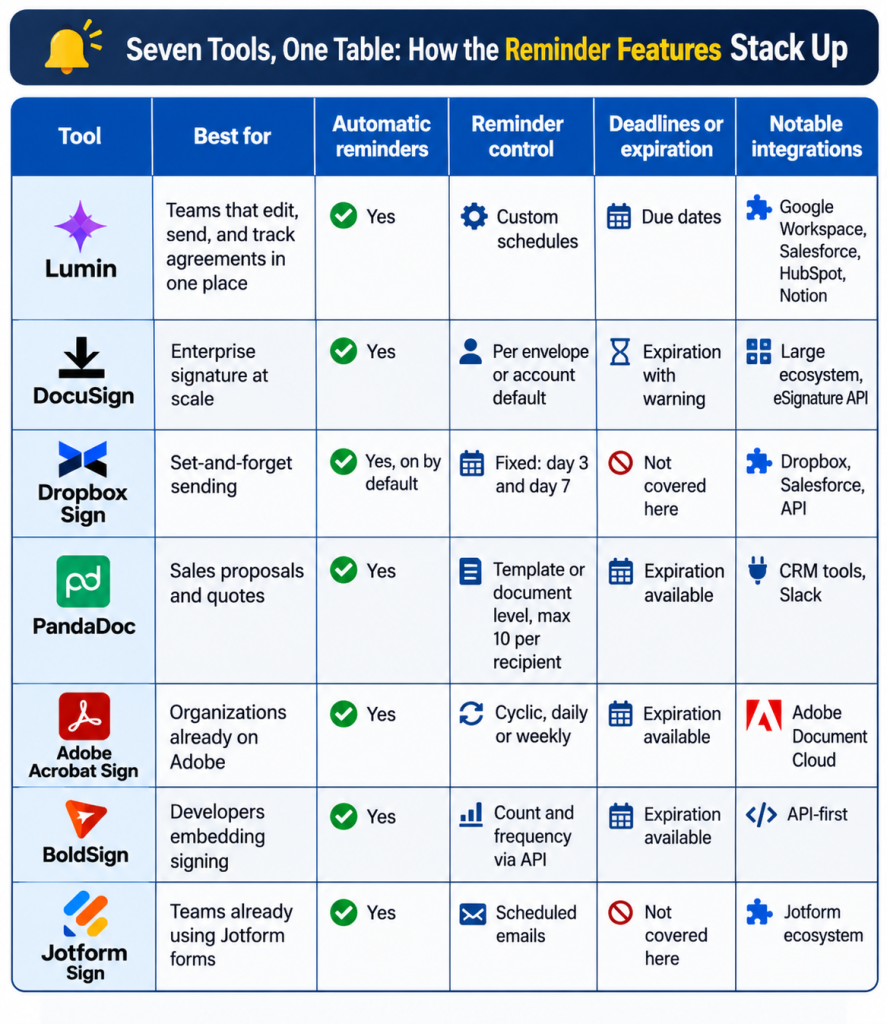
NEW YORK, NY — November 07, 2026 — Lumin PDF Corporation announced automated signing reminders within its agreement platform, allowing senders to schedule follow-up emails for recipients who have not completed a document. The update connects reminders and document due dates with PDF editing, electronic signing and completion tracking.

The feature addresses the administrative work of identifying incomplete agreements and contacting recipients individually. Senders define reminder schedules within the same platform they use to prepare and send documents, while a dashboard shows which recipients have signed and which still need to act.

Scheduling and Tracking

Automated reminders extend Lumin’s esignature PDF workflow beyond the initial document request. Teams can:

  • Edit PDFs and add signing fields before sending.
  • Create reusable document templates.
  • Define custom email reminder schedules.
  • Set document due dates to help organize agreements.
  • Monitor signing progress through the dashboard.

Reminder emails target recipients who have not completed a document. Due dates provide a separate organizational setting, connecting follow-up timing with the agreement being managed.

For teams handling agreements across multiple projects, the dashboard brings outstanding documents and recipient activity into one view. Notifications also inform teams as recipients act.

Recipient Access

Recipients can complete documents on a computer, tablet or phone without creating a Lumin account. External signers can therefore participate while the sending team manages document preparation, follow-up and tracking within Lumin.

Reusable templates support preparation, and signing fields identify where recipients need to act. The reminder feature adds scheduled follow-up to those existing functions.

Additional product information is available at luminpdf.com.

About Lumin PDF Corporation

Lumin PDF Corporation provides an agreement platform with PDF editing, reusable templates, electronic signing and document tracking. Its tools support document preparation, external signature collection, automated email reminders and completion records within one workflow.

Media Contact

Kateryna Ponomarenko
Company: 42DM
Email: kateryna.ponomarenko@42dm.net
Website: https://www.luminpdf.com/

C Brooks Paving Plans Crew and Equipment Capacity Increase Across Six Central Texas Counties

BULVERDE, Texas – November 7 2026 – C Brooks Paving announced plans to increase crew availability and equipment deployments for paving and sub-base construction projects across its existing six-county Central Texas service area. The planned operational increase covers residential, commercial, ranch and municipal work; it does not represent entry into new service territories.

Courtnay Brooks, owner of the Bulverde-based contractor, identified additional crew capacity as the focus of the plan. Equipment deployments are also included. The company has not announced an implementation date or quantified the planned increase.

Project Scope and Service Area

The plan applies to projects in Comal, Bexar, Kendall, Blanco, Kerr and Gillespie counties. Work covered includes Texas Hill Country chip seal projects, residential driveway paving in Bulverde and commercial paving in the San Antonio area.

Supporting construction activities include grading, aggregate base preparation and asphalt repairs. The announcement encompasses both paving and associated preparation work rather than a single construction site or contract.

Project requirements vary according to site conditions, drainage and intended traffic. The scope therefore includes work below the finished pavement surface as well as paving and repair activities.

Implementation Status

The announcement describes a planned capacity increase, not a completed expansion. Current and anticipated crew counts, additional equipment quantities and an investment amount have not been disclosed.

C Brooks Paving has not announced revised project schedules or estimated how much additional work the planned increase would accommodate. No shorter wait times, new project start dates or changes to completion schedules have been established by the announcement.

The geographic scope remains unchanged: the planned crew and equipment increase concerns work within the company’s current six-county service area.

Company Information

Company information is available at https://cbrookspaving.com/. Company materials also identify the C Brooks Paving Google Business Profile as a source of customer feedback, separate from this operational announcement.

About C Brooks Paving

C Brooks Paving is a paving contractor based in Bulverde, Texas, operated by Courtnay Brooks. The company provides chip seal, asphalt paving, surface maintenance, repairs and site preparation for residential, commercial, ranch and municipal projects, along with San Antonio industrial paving for warehouses, yards and other heavy-use sites. We serve Comal, Bexar, Kendall, Blanco, Kerr and Gillespie counties.

Media Contact

Courtnay Brooks, Owner
C Brooks Paving
cbrookspaving@aol.com
https://cbrookspaving.com/