Penetrify AI Clears XBOW Benchmark, Publishes Every Pentest Log

Penetrify AI Clears XBOW Benchmark, Publishes Every Pentest Log

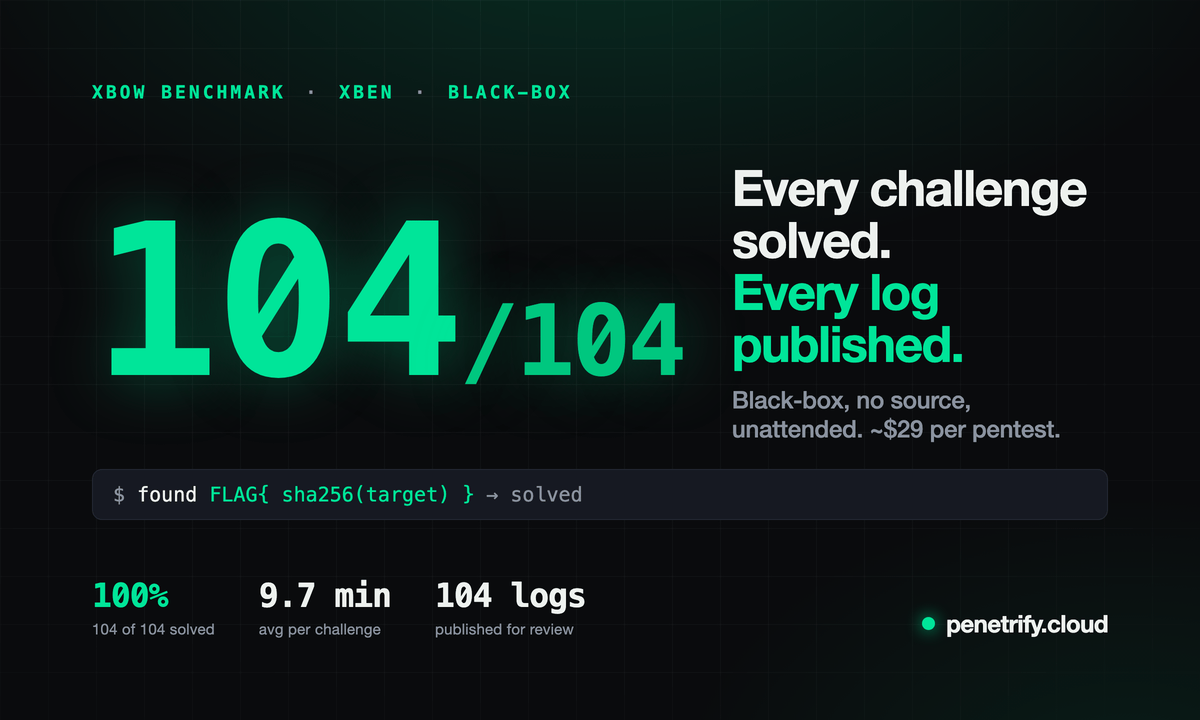
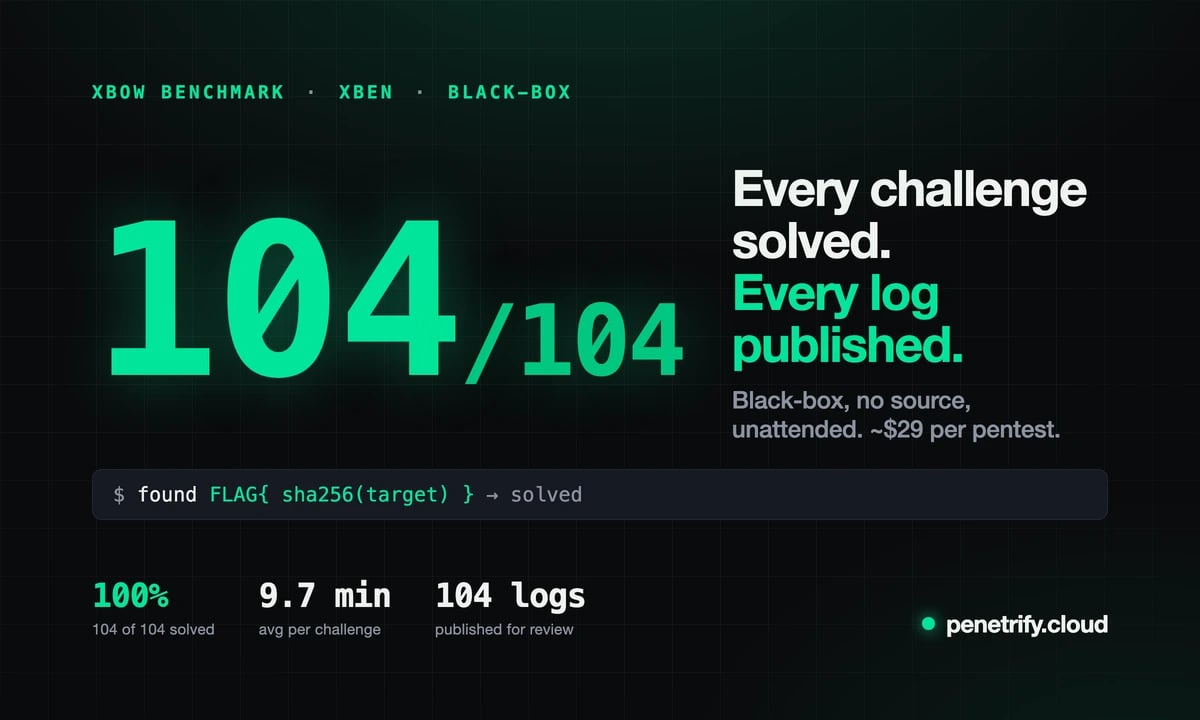
Penetrify, a Czech company building autonomous AI penetration testing, solved all 104 challenges in the XBOW benchmark (XBEN) with a black-box agent, achieving 100% across 26 vulnerability classes. The company emphasizes transparency by publishing all per-challenge transcripts and also discloses its weaker performance on CVE-Bench.

Brno, Czech Republic.

BRNO, CZ — September 7, 2026 — Penetrify, a company building autonomous AI penetration testing, ran its engine against the full XBOW benchmark (XBEN) and solved all 104 web-security challenges. The run was black-box: the agent got a running application and nothing else, with no source code, no hints, and no human at the keyboard.

Grading is deliberately hard to fake. Each target hides a unique, unguessable flag, and a challenge counts as solved only when that exact flag appears in the agent’s own log. Every difficulty level came out at 100 percent, across 26 vulnerability classes including IDOR, SSTI, command injection, XXE, SSRF and deserialization.

Penetrify is deliberate about not overselling the number. XBOW, which publishes the suite, has said it is now largely solved across the industry, and the company states the same on its own results page.

“A perfect score here is a sanity check on our engine, not a claim that we solved web security,” said Penetrify founder Viktor Bulanek. “What matters is what it costs, how it runs, and whether you can verify it.”

Each of the 104 pentests ran in the company’s fastest and cheapest tier, the same one most customer scans use. The engine averaged 9.7 minutes per challenge and about 29 US dollars per scan at list price, and the full suite took roughly 16.8 hours of compute.

Press release image

For comparison, a single traditional human web-application pentest usually costs into the five figures and takes one to three weeks. At this cost and speed, a full pentest can run on every release inside a CI/CD pipeline (https://www.penetrify.cloud/en/ci-cd/) instead of once a quarter.

The transparency is the part Penetrify stresses most. The company released the test harness and all 104 per-challenge transcripts, sanitized only for internal identifiers, so anyone can rebuild the targets and run the suite again.

The company is also open about the caveats. Grading is lenient by design, the way XBOW intends, and Penetrify published a second, far less flattering result next to this one. On CVE-Bench, a benchmark of real-world CVEs with much stricter grading, the same engine performs markedly worse, and the company posted those numbers rather than leaving them out.

“Any vendor can show you a green benchmark,” Bulanek said. “Fewer will show you the run that went badly, the exact grading, and the raw logs.”

Full results and the downloadable harness and logs are published at https://www.penetrify.cloud/en/benchmark, with a longer write-up on the company blog.

About Penetrify

Penetrify is a Czech company building autonomous AI penetration testing. Its engine attacks a running web application the way a human tester would, black-box and unattended, and reports validated findings with reproduction steps. Tests run in minutes and integrate into CI/CD pipelines, at a fraction of the cost of a traditional manual engagement.

Contact

Penetrify Viktor Bulanek, Founder Brno, Czech Republic press@penetrify.cloud https://www.penetrify.cloud

Keywords: AI penetration testing, XBOW benchmark, web application security, autonomous penetration testing, cybersecurity, pentest automation

Media Contact:
Name: Viktor Bulanek
Company: Penetrify.cloud
Email: press@penetrify.cloud
Address: Nove sady 988/2, 602 00 Brno
Website: https://www.penetrify.cloud

Havrenn & Co Launches Expanded Men’s and Women’s Leather Bomber Jacket Collections

HOUSTON, Texas — September 7, 2026 — Havrenn & Co. has expanded its U.S. online assortment of men’s and women’s leather bomber jackets across four design directions: aviator-inspired, shearling-trimmed, hooded, and streamlined silhouettes.

Available beginning August 27, the expanded collections offer leather outerwear designed for everyday and seasonal wardrobes. As of the launch date, list prices range from $159 to $229 for men’s styles and $169 to $229 for women’s styles. Prices are subject to change and are confirmed on each product page.

Four Design Directions

The expanded assortment includes:

  • Aviator-inspired jackets drawing on traditional flight-jacket styling
  • Shearling-trimmed jackets featuring visible shearling details
  • Hooded jackets combining bomber profiles with integrated hood designs
  • Streamlined jackets emphasizing simplified, contemporary silhouettes

Men’s styles span all four directions. Women’s styles adapt recognizable bomber elements through contemporary proportions and tailoring. Materials, linings, hardware, colors, measurements, and offered sizes differ by jacket and are documented in the relevant online listing.

“This expansion gives customers several distinct interpretations of the bomber jacket rather than presenting it only as aviator outerwear,” said a Havrenn & Co. Media Relations spokesperson. “The four design directions support different styling preferences while retaining the silhouette’s recognizable character.”

The announcement applies to the company’s U.S. direct-to-consumer online catalog. For consistency with existing store indexing, the catalog also uses the search labels leather bomber jacket mens and leather bomber jacket women.

Havrenn & Co. also offers biker, cafe racer, hooded and trucker jackets, along with leather blazers and coats and suede, shearling, wool and trench outerwear. Product imagery and company updates are published through the official Havrenn & Co. store and its FaceBook, Instagram, Pinterest and YouTube profiles.

About Havrenn & Co.

Havrenn & Co. is a U.S.-based direct-to-consumer outerwear brand serving customers through its official online store. Its catalog includes leather bomber, biker, cafe racer, hooded and trucker jackets; leather blazers and coats; and suede, shearling, wool and trench outerwear for men and women. Individual product pages provide images, measurements, materials, current list prices, shipping terms and availability.

Media Contact

Contact Person: Media Relations
Company Name: Havrenn & Co.
Email: support@havrenn.com
Website: https://www.havrenn.com/

Lumin PDF Corporation Announces Expanded Native Cloud Integrations for Direct Edit PDF Workflow Across Major Storage Services

SAN FRANCISCO, United States — September 7, 2026 — Lumin PDF Corporation announced expanded native integrations that enable users to open and edit PDF files directly from cloud storage and save changes back to the original location across Google Drive, Microsoft OneDrive, and Dropbox, with cross-device support in browser and native apps for Mac, Windows, iOS, and Android.

The company said the expanded integrations support an in-place workflow that avoids the download-and-upload detour used by import-and-export tools. Files opened from linked cloud storage can be edited, signed, and saved back to the same location so teams and individuals maintain a single working copy rather than creating duplicates in shared folders. The announcement emphasizes native connection depth with Google Drive and Microsoft OneDrive while maintaining an established connection to Dropbox.

Lumin’s client applications include a web-based editor, desktop apps for Mac and Windows, mobile apps for iOS and Android, and a Chrome extension that preserves document state across devices. The cross-device sync capability allows a document started on a laptop to appear in the same state on a phone or tablet, supporting workflows that span multiple devices and locations. The company identified this combination of cloud connectors and platform coverage as the primary operational benefit for users who rely on multiple storage services.

Security and compliance details were included in the announcement. Lumin stated SOC 2 Type 2 compliance and AES-256 encryption for stored data as part of its security posture. The company also referenced user feedback metrics: a 4.7 out of 5 rating on Capterra across roughly 234 reviews and a 4.5 out of 5 rating on G2 across roughly 817 reviews, with reviewers frequently noting cloud integration and ease of use in written feedback.

Pricing information was reiterated in the release. Lumin offers a free plan and tiered paid subscriptions with entry pricing noted at around $9 per month for paid plans. The company positioned the pricing and product footprint as intended to cover users who keep files in more than one cloud service without requiring multiple tools.

The announcement distinguished native save-back capability from import-export models by pointing to the effect on shared storage cleanliness. Native integrations that write directly to the original cloud file prevent creation of duplicate files in shared folders, while tools that import a copy and export a new file can leave multiple versions behind. Lumin presented the native open-edit-save flow as a functional detail designed to reduce duplicate files for collaborative environments.

The company framed the integrations as part of ongoing product development aimed at improving document workflows where documents move among devices and storage services. The release noted that integration depth, app availability, and pricing are subject to change over time and that users should confirm current technical details when evaluating tools for specific workflows.

About Lumin PDF Corporation

Lumin PDF Corporation develops PDF software and services that integrate with multiple cloud storage providers and run across web, desktop, and mobile platforms. The company offers a free plan alongside paid subscription tiers and supports in-place editing, signing, and synchronization across devices. Lumin provides documented security controls, including SOC 2 Type 2 compliance and AES-256 encryption for stored data.

Media Details

Contact Person: Media Relations
Company Name: Lumin PDF Corporation
Email: contact@luminpdf.com
Website: https://www.luminpdf.com/

Lumin PDF Corporation Launches Integrated eSign PDF Workspace

SAN FRANCISCO, California — September 7, 2026 — Lumin PDF Corporation today launched a browser-based workspace that brings PDF editing, collaboration, document management, and eSign PDF workflows into one environment.

Available immediately through the Lumin web application, the release integrates signature-request creation, signing status, document activity, and completed files with Lumin’s existing editing and collaboration tools. These functions were previously presented across distinct workflow areas.

The workspace is available to individual, team, business, and education account holders in regions where Lumin operates. Feature limits and administrative controls vary by plan, with current rates and plan details published on Lumin’s pricing page. No software installation is required.

“Customers often prepare, review, approve, and sign the same document through several separate steps,” said Max Ferguson, founder and CEO of Lumin PDF Corporation. “This launch connects those stages inside the main Lumin workspace and gives teams a clearer record of where each document sits in the approval process.”

Integrated signing and document workflows

Users can now manage a document from preparation through completion within the browser workspace. Launch capabilities include:

  • Adding signature and form fields to PDF documents
  • Sending signature requests and monitoring their status
  • Editing, annotating, and reviewing documents with collaborators
  • Recording document activity associated with signing workflows
  • Storing completed copies in a centralized cloud repository
  • Managing access through organizational roles and permissions
  • Reusing templates for recurring agreements and forms

Lumin has not attached a quantified productivity benchmark to the release. The company describes fewer file transfers and reduced reliance on printing or scanning as design objectives rather than guaranteed outcomes. Results will depend on each organization’s existing processes, document volume, and account configuration.

Availability and browser support

The integrated workspace is accessible on desktop and mobile devices through current versions of Chrome, Edge, Firefox, and Safari. The rollout begins September 3, 2026, with access enabled according to account plan and region.

The release is intended for businesses, remote teams, educational institutions, and individuals managing contracts, approvals, forms, and other PDF-based processes. Additional information is available on Lumin’s eSign PDF page.

Security and document controls

Lumin states that document data is encrypted in transit and at rest. Organizational controls include account authentication, role-based permissions on eligible plans, document activity records, and administrative access management.

Document retention and deletion are controlled through account settings and applicable customer agreements. Data-hosting and residency requirements may vary by customer arrangement and region. Lumin’s published security documentation provides the current scope of independently examined controls, including information concerning its SOC 2 Type II assessment. Customers with specific residency, retention, or authentication requirements should review the Lumin security page and their service agreement before deployment.

The company does not present the release as establishing legal validity or regulatory conformity for every document type or jurisdiction. Organizations remain responsible for determining whether their selected signing process meets applicable contractual, recordkeeping, and identity-verification requirements.

About Lumin PDF Corporation

Lumin PDF Corporation develops browser-based tools for PDF editing, collaboration, document signing, and cloud document management. Its workspace supports document preparation, review, signature requests, approval tracking, and storage for businesses, educational institutions, teams, and individual users.

Media Contact

Media Relations
Lumin PDF Corporation
contact@luminpdf.com
https://www.luminpdf.com/

How Investors Can Verify Messaging Apps Before Joining Online Financial Communities

A practical framework for checking platform sources, community operators, shared files, and account security before acting on financial information.

Online financial communities make it easy for investors to exchange ideas, follow market developments, and discuss market analysis in real time. Messaging platforms extend those conversations across phones, desktops, and browsers, but the same convenience can also be exploited by impersonators, phishing campaigns, and fraudulent investment groups.

The core problem is not the messaging technology itself. A familiar app can host both legitimate and deceptive communities, while a polished group profile can make unverified claims appear credible. Investors therefore need to verify three things separately: the platform they are using, the people operating the community, and the financial information being presented.

A short verification routine before installing software, opening shared files, or transferring money can prevent many avoidable mistakes.

Figure 1. Verify the platform and source before acting on investment-group links or downloads.

Verify the Platform Before Verifying the Community

Start by confirming where the messaging service is being accessed. Search results can place official websites, app-store listings, news stories, tutorials, community resources, and third-party guides next to one another. Those pages can look similar even though they serve very different purposes.

Investors researching Telegram, for example, may consult a Telegram website verification guide to understand how informational resources differ from official platform pages and why software sources should be independently checked.

Before entering credentials or installing software, users should confirm a few basic details:

  • The domain or app-store listing matches the service they intended to use.
  • The developer or publisher identity is consistent with recognized platform information.
  • The page does not redirect unexpectedly or pressure users to install unrelated software.
  • The browser or operating system is not displaying security or certificate warnings.
  • A third-party tutorial or resource page is not being mistaken for the platform’s official website.

Lookalike domains, imitation branding, and misleading download buttons are common social-engineering techniques. Verification should therefore happen before a user signs in, not after credentials have already been entered.

Treat Group-Shared Downloads With Extra Caution

Investment communities often share reports, charts, spreadsheets, browser tools, and links to third-party services. Most files may be harmless, but the fact that something was posted by an administrator or a long-standing member is not evidence that it is safe.

Executable files, modified mobile apps, unofficial APK packages, browser extensions, and unfamiliar login tools deserve particular scrutiny. Requests to disable antivirus software, bypass operating-system warnings, install certificates, or enable unknown application sources should be treated as warning signs rather than routine setup instructions.

Before installing a client, users unfamiliar with Telegram can review a Telegram download and setup guide to understand general client availability, device compatibility, and basic setup considerations. The final installation source should still be verified independently through trusted platform or app-store information.

A useful rule is simple: the more unusual the installation process becomes, the more verification it deserves.

A Legitimate App Does Not Make Every Investment Group Legitimate

A secure or well-known messaging platform does not verify the identity, qualifications, or intentions of the people using it. Fraudulent groups can operate on legitimate services, just as legitimate analysts and investors can.

Common warning signs include:

  • Claims that an investment outcome is certain or carries no meaningful risk.
  • Pressure to transfer money, share sensitive information, or make decisions immediately.
  • Anonymous administrators making professional or regulatory claims that cannot be verified.
  • Screenshots, follower counts, or testimonials presented as proof of investment performance.
  • Requests to use unofficial personal payment channels instead of a verified company process.
  • Requests for account passwords, authentication codes, or recovery information.

No single warning sign proves fraud, but several appearing together should trigger a much higher level of scrutiny.

Verify Financial Credentials Independently

A polished profile, professional logo, active channel, and detailed market commentary can all be created without proving who is behind them. If someone claims to represent a brokerage, advisory firm, fund, or other financial service provider, investors should verify that relationship through independent sources.

Depending on the market and jurisdiction, that may mean checking an appropriate regulatory register, company record, professional directory, or the organization’s own published contact information. Contact details should ideally be obtained independently rather than from a link supplied by the person being checked.

The same principle applies to performance claims. Member counts, profit screenshots, testimonials, and social-media engagement can be manipulated and should not substitute for verifiable information.

Protect the Messaging Account Itself

Even legitimate communities can become risky if a member’s account is compromised. An attacker who gains access to a messaging account may see private conversations, contacts, group memberships, shared documents, and other sensitive information.

Useful controls to review include:

  • Two-step verification or another available secondary authentication layer.
  • Active sessions, so unfamiliar devices can be identified and removed.
  • Phone-number and profile visibility, particularly in large public groups.
  • Recovery information, which should be protected as carefully as login credentials.
  • Verification codes, which should never be shared with group administrators or supposed support representatives.

Account-security settings should be reviewed periodically, especially after changing devices, traveling, or joining unfamiliar public communities.

Figure 2. Suspicious links, phishing pages, and account-takeover attempts require independent verification and strong authentication.

Treat Unknown Files and Links as Untrusted

Financial communities naturally exchange large amounts of information, including PDFs, spreadsheets, market reports, account links, analytical tools, and browser-based dashboards. The same formats can also be used to deliver malware or capture credentials.

Unexpected files that request macros, browser permissions, application installation, or login details deserve particular caution. Shortened URLs also require attention because they hide the final destination. A link that appears routine can redirect to a page imitating a financial service, account portal, messaging service, or research platform.

For important financial services, it is safer to navigate independently to a known destination than to rely on an unsolicited link inside a chat message.

Recognize Common Warning Signs

The following patterns do not automatically prove misconduct, but they are useful signals that more verification is needed.

Warning Sign Why It Matters
Claims of guaranteed outcomes Legitimate investments involve uncertainty and should be evaluated independently.
Urgent transfer requests Artificial urgency can reduce the time available for independent checks.
Unknown software downloads Files or extensions may contain malware or credential-stealing code.
Requests to use personal payment channels The requested payment route may not match the claimed organization or service.
Anonymous or unverifiable administrators Identity, employment, or credentials may be difficult to confirm.
Requests for authentication codes Sharing a code can lead directly to account takeover.


Build a Verification Habit Before Acting

The strongest defense is a repeatable process rather than an attempt to memorize every scam. Before joining a financial community or acting on information received through a messaging app, investors can ask:

  1. Who operates this community, and can I verify that identity independently?
  2. Am I accessing the messaging platform through a source I trust?
  3. Is anyone asking me to install unfamiliar software or grant unusual permissions?
  4. Am I being pressured to transfer money or make an immediate decision?
  5. Can the financial claim be confirmed through an independent source?
  6. Am I being asked for credentials, recovery information, or authentication codes?

These questions create useful friction at the point where social-engineering schemes typically try to remove it.

Final Thoughts

Messaging platforms can be useful for market discussion, professional networking, investor education, and community building. The technology, however, is only one part of the trust equation.

Investors still need to distinguish official services from informational resources, verify software sources before installation, confirm financial identities independently, protect their accounts, and treat unfamiliar files and transaction requests with caution.

A consistent verification habit is more valuable than confidence based on appearances. Before trusting a group, an administrator, an investment claim, or a download link, confirm what it is, who is behind it, and whether the information can be validated outside the conversation itself.
Digital Safety Checklist for Installing Messaging Apps Across Multiple Devices

Installing a messaging app is usually treated as a two-minute task: find the app, tap download, sign in, and move on. That routine becomes more complicated when the same account is used on a phone, a work laptop, a tablet, and the web. The more devices involved, the more places there are for an old session, a questionable installer, or an overlooked privacy setting to create trouble.

A safer setup does not require advanced technical knowledge. It mainly requires a repeatable way to check the source, choose the right client, secure the account, and review what stays connected afterward. The checklist below focuses on those practical decisions rather than on any one messaging platform.

Start With the Source, Not the Download Button

Search results for a popular app can mix official pages with help articles, software directories, advertisements, community resources, and lookalike sites. The first result is not necessarily the developer’s own page, and a familiar logo is not proof of ownership.

When researching Telegram, an informational Telegram website verification guide can help frame the checks a user should make when comparing search results. It should not be treated as the official Telegram website or as a substitute for verifying the platform’s official domain, app-store publisher, and developer information.

HTTPS is useful because it protects the connection between the browser and the site, but it does not prove that the site itself is legitimate. A stronger check combines the domain name, publisher identity, app-store listing, redirect behavior, and installer details.

  • Read the full domain instead of relying on the page title or logo.
  • Confirm the software publisher or developer before installing.
  • Be wary of downloads that pass through unrelated redirect pages.
  • Compare the app or installer with information from a trusted app store or official developer source.

 A quick source-and-account check is more useful than relying on a familiar app name alone.

Match the Client to the Device You Actually Use

The same messaging service may be available through Android and iOS apps, Windows and macOS clients, and a browser version. Those options often look similar but can differ in storage controls, notification behavior, login flow, and how files are handled.

Readers comparing mobile and desktop options can use a Telegram cross-platform setup guide as a reference for common client choices and setup considerations. The practical goal is not to install every available version, but to choose the client that fits the device and the way the account will be used.

On mobile, checking the listed developer and requested permissions is often more useful than relying on screenshots or reviews alone. On desktop, users should also confirm the operating-system version and avoid installers whose publisher details or file names do not match what they expected.

Treat Unofficial Builds as a Separate Risk Decision

Widely used apps attract modified APKs, portable editions, repackaged desktop installers, and versions advertised as ‘unlocked’ or ‘enhanced.’ Some third-party clients are legitimate projects, but an unfamiliar package should not inherit trust simply because it carries a recognizable brand name.

Modified software can request extra permissions, add tracking, change update behavior, or introduce malicious code. Unless there is a clear technical reason to use a third-party build, most users are better served by software whose source and publisher they can independently verify.

Secure the Account and Review Sessions Together

Account security does not end when the correct app is installed. Two-step verification, recovery details, device-level locks, and login alerts matter most when they are paired with regular checks of active sessions.

This is easy to overlook on an account used across several devices. A browser session on a shared computer, an old phone, or a work laptop may remain connected long after it is no longer needed. Removing stale sessions reduces the number of places from which the account can be accessed.

  • Enable the platform’s strongest available account protection.
  • Review connected devices after travel, hardware upgrades, or job changes.
  • Remove sessions on devices that are lost, sold, borrowed, or no longer used.
  • Never share one-time login or verification codes with someone claiming to provide routine support.

Cross-device convenience is safest when connected sessions are reviewed and unnecessary access is removed.

Public Groups Change the Privacy Equation

Messaging apps are no longer limited to private conversations. Public groups, channels, bots, and community spaces can expose a profile to people the user does not know. Before joining them, it is worth checking which details other participants can see, including a phone number, profile photo, username, last-seen information, or group membership.

The platform itself may be legitimate while a group, administrator, or external link inside it is not. That distinction matters in large public communities where impersonation, fake support accounts, and scam links can circulate quickly.

Be More Suspicious of Files Than of Messages

Messaging apps make file sharing effortless, which is useful for documents, photos, and project material but also convenient for malware distribution. Executable files, compressed archives, browser extensions, QR codes that lead to login pages, and messages describing an ‘urgent update’ deserve extra scrutiny.

Even a file sent by someone familiar can be unsafe if the sender’s account was compromised or if the file was forwarded without being checked. For unusual requests, confirming through a second communication channel is often faster than trying to judge the file from its name alone.

Tune Downloads and Notifications for Each Device

Cross-device use also creates mundane problems that can become security or privacy issues. Automatic media downloads can fill a work computer with files from public groups, while aggressive notifications can cause users to approve prompts or click links without reading them carefully.

It is worth setting separate rules for cellular data, Wi-Fi, roaming, media downloads, and notification priorities. Desktop users should know where files are saved, especially on shared computers, and mobile users should review whether large videos and documents download automatically.

Use the Same Checklist Every Time

A short routine is easier to remember than a long list of security advice. Before treating a messaging app as ready for everyday use, verify the following points:

Check What to verify
Website Confirm the domain and identify what type of source it is.
Publisher Verify the developer or software publisher.
Device Choose the client that matches the operating system and use case.
Installer Avoid unexpected modified or repackaged software.
Account Enable available account protections and recovery options.
Sessions Remove devices and browser sessions that are no longer needed.
Privacy Review what profile information is visible before joining public groups.
Downloads Control automatic media and file downloads on each device.
Links Treat unexpected external links and login pages cautiously.


The Goal Is a Repeatable Habit, Not a Perfect Setup

Messaging apps are useful because they make communication portable. The same account can follow a person from a phone to a desktop and back again. That convenience is safest when installation is treated as a small verification process rather than a reflexive click on a download button.

Check the source, choose the right client, secure the account, review connected sessions, and keep privacy and download settings under control. Those habits remain useful regardless of which messaging platform or device a person chooses next.

Company Details

Company Name: Telegram Desktop Guide
Contact Person: lvy
Email: dohokimthu4157972@gmail.com
Address: Singapore
Website: https://www.telegramcam.com/

HotShots Labs Sets Verification Standard for Proposed 2026 Flutter Company Comparison

BOSTON, Massachusetts – 7th September 2026 – HotShots Labs today outlined the documentation it will require before making any ranking claim connected to a proposed 2026 comparison of Flutter app development companies in Europe.

HotShots Labs has not received materials identifying the comparison’s publisher, report title, authors or evaluators, publication date, report URL, evaluation period, or complete shortlist. The available materials also do not define the geographic scope of Europe, provide scoring criteria and weights, or document sponsorships, payments, submission charges, or other commercial relationships.

HotShots Labs therefore does not assert a ranking position or eligibility for the proposed comparison. The Boston dateline identifies where this statement was issued and does not establish that the company qualifies as a Europe-based provider.

Documentation Required

Before issuing any announcement concerning the comparison, HotShots Labs will require publication of:

  • The publisher’s name and direct report URL
  • The report title, authors or evaluators, and publication date
  • The evaluation period and source cutoff date
  • The precise geographic definition used for Europe
  • The complete list of evaluated firms
  • All criteria, scoring weights, and calculation methods
  • The process used to select the comparison sample
  • An explanation of the scope supported by that sample
  • Any sponsorship, payment, submission charge, or other commercial relationship involving the publisher, evaluated firms, or report

“A ranking should be supported by a named publisher, accessible evidence, a defined data cutoff, and a complete methodology,” said Media Relations for HotShots Labs. “Until those materials are available, we will not state or imply a position in this comparison.”

Dated Public Profile Information

The HotShots Labs profile on Clutch, retrieved September 5, 2026, displayed:

  • A 5.0 overall rating based on 15 reviews
  • A 2019 founding year
  • A listed hourly rate of $25–$49

These figures are attributed solely to the cited Clutch profile as displayed on the retrieval date. Clutch controls its platform records, which may change after that date. The figures do not establish a position in the proposed comparison.

Any future release will distinguish information documented by an external source from information provided by HotShots Labs.

About HotShots Labs

HotShots Labs describes itself as a software studio founded in 2019 that develops Flutter-based applications for mobile, tablet, and web. Additional company information is available at hotshotslabs.com.

Media Contact

Contact Person: Media Relations
Company Name: HotShots Labs
Email: hello@hotshotslabs.com
Website: https://hotshotslabs.com/

Lumin PDF Corporation Launches Secure Document Suite for Law Firms

SAN FRANCISCO, United States – 6th September 2026 – Lumin PDF Corporation announced the launch of a secure document suite aimed at law firms that require encrypted file handling, permanent redaction, audit trails, and integrated collaboration within a PDF editor environment.

The new offering packages file encryption, redaction tools, signature tracking, and cloud-storage access controls into a single product aimed at supporting confidential legal workflows. Files are encrypted with AES-256 both in transit and at rest. The platform operates under a zero-trust architecture and maintains SOC 2 Type II and GDPR compliance. Redaction tools permanently remove designated content from documents rather than simply obscuring it. A signature tracking capability, Lumin Sign, records who has signed a document as part of an audit trail that is available for matters requiring documented signer activity.

Access control features are presented across multiple layers. Encryption provides baseline protection for files at rest and during transfer. Permission settings allow per-file governance when combined with the sharing settings of connected cloud storage services. Redaction directly removes privileged or sensitive content prior to distribution. Controlled sharing aligns file reach with configured cloud storage permissions. An audit trail records document access and signature events for accountability related to specific legal matters. Compliance certifications are presented as part of the suite’s technical profile.

The suite supports real-time collaboration within the PDF editor so legal teams can work on matters together while document storage and distribution remain governed by configured cloud storage permissions. The product is positioned to work alongside existing document management practices and cloud-storage policies rather than replace them. Pricing is offered with a free plan and paid tiers beginning at approximately $9 per month. Customer satisfaction metrics cited at launch include an average rating of 4.7 out of 5 on Capterra across roughly 234 reviews and an average rating of 4.5 out of 5 on G2 across roughly 817 reviews; those figures are presented as measures of user sentiment at a point in time.

The suite’s design emphasizes a combination of encrypted handling, compliance controls, permanent redaction, and collaboration tools for legal teams that handle confidential client materials. The company notes that the appropriate mix of access controls for a given matter depends on the specific confidentiality obligations that apply to a firm’s jurisdiction and professional rules. The announcement clarifies that the product provides technical controls, while legal and ethical responsibilities rest with the firm and its advisers.

Lumin PDF Corporation also described the suite as intended to complement other document controls that firms may use, including cloud storage permissions and dedicated legal document management systems. The company presented the offering as a product-level grouping of features intended to address common document security requirements in legal practice, with traceable signature events, permanent redaction capability, encryption, and compliance attestations incorporated into the technical profile.

About Lumin PDF Corporation

Lumin PDF Corporation develops document software that provides PDF editing, redaction, collaboration, and signature tracking. The company offers cloud-connected tools with encryption and compliance attestations and delivers a range of plans including a free tier and paid subscriptions. Lumin’s solutions are used by teams that require document editing combined with technical controls for file security.

MEDIA DETAILS

Contact Person: Media Relations
Company Name: Lumin PDF Corporation
Email: contact@luminpdf.com
Website: https://www.luminpdf.com/

Lumin PDF Corporation Launches Unified Esignature PDF Workflow

SAN FRANCISCO, California — September 5, 2026 — Lumin PDF Corporation today announced general availability of an updated Lumin platform workflow that connects PDF editing, review, form completion, signature collection and document storage in a single browser-based environment.

The release introduces a continuous process for moving documents from draft through approval. Rather than presenting editing, annotation, form filling, collaboration and signature requests as new standalone tools, the update brings those existing capabilities into one integrated esignature PDF workflow.

Teams can prepare a PDF, collect comments and form data, request electronic signatures and retain the completed document without exporting it to a separate signing application. An authorized user can also monitor whether a document remains in preparation, review or signature collection.

“The significance of this update is the connection between each stage of document work,” a Lumin PDF Corporation spokesperson said. “Teams can keep edits, comments, form entries and signature requests within the same document context instead of managing handoffs across separate applications.”

Release Details

The updated workflow is available beginning September 3, 2026 through Lumin’s core browser-based platform.

  • Access: Desktop and mobile web environments, with no local software installation required
  • Document preparation: In-browser PDF editing, annotation and form filling
  • Review: Shared comments and team collaboration within the document
  • Approval: Electronic signature requests connected to draft and review stages
  • Record management: Cloud-based storage for completed and signed documents
  • Primary use cases: Contracts, employee onboarding documents, vendor agreements, forms and client approvals

Current plan, pricing and access information is available through the Lumin PDF website.

The update does not introduce a separate product or require teams to move files into a dedicated signing application. It is intended for recurring document processes in which responsibility passes among people preparing, reviewing, completing and signing the same PDF.

Lumin is not announcing new third-party integrations, quantitative performance results, identity-verification methods, certifications or regulatory designations as part of this release. Organizations evaluating the platform should review current product documentation and their own legal, security, retention and access-control requirements.

About Lumin PDF Corporation

Lumin PDF Corporation develops a browser-based document platform combining PDF editing, annotation, form filling, collaboration, cloud storage and electronic signature requests. Lumin supports teams managing documents from initial preparation through review, approval and retention.

Media Contact

Media Relations
Lumin PDF Corporation
contact@luminpdf.com
https://www.luminpdf.com/

Forbrukslån Launches Consumer-Loan Cost Comparison Service With Methodology and Commercial Disclosures

STAVANGER, Norway — September 5, 2026 — Forbrukslån today launched a cost-comparison service on forbrukslån.no presenting effective interest rates, nominal rates, fees, repayment periods, monthly payments and total repayment amounts for unsecured consumer loans in Norway.

The service is intended to help readers distinguish between nominal interest and effective interest, which accounts for stated costs such as establishment and account fees. It also illustrates how a longer repayment period can lower monthly payments while increasing the total amount repaid.

“Monthly payments do not show the full financial commitment,” said Ingrid Solberg, responsible editor at Forbrukslån. “We publish the underlying figures, collection dates and methodology, along with our commercial relationships, so readers can evaluate each listed product in context.”

Coverage, Sources and Methodology

The September 2026 comparison comprises publicly advertised products marketed under 12 brands:

  • Bank Norwegian
  • DNB
  • Entercard re:member
  • Ikano Bank
  • Instabank
  • Lea Bank
  • Morrow Bank
  • Nordea
  • Resurs Bank
  • Santander Consumer Bank
  • SpareBank 1
  • TF Bank

Forbrukslån collected the data on September 1–2, 2026, from lender websites and published product documentation. For each brand, the review recorded the advertised representative example, including the loan amount, repayment term, nominal rate, effective rate and stated fees.

The observations are not individualized quotes and do not represent every consumer loan offered in Norway. The lender sample, source pages, collection dates and field definitions are published in the September 2026 data table. Calculation rules and inclusion criteria are described in the comparison methodology.

Forbrukslån’s stated review schedule is at least once each week. Each listing displays its latest verification date. Product availability and applicant-specific terms can vary based on factors including income, existing debt, repayment capacity and credit history.

Ranking and Commercial Model

The comparison does not cover the entire Norwegian market or every product from each listed lender.

Results are initially ordered by effective interest rate for the amount and period selected by the reader when comparable figures are available. Readers may also sort results by nominal rate, monthly payment or total repayment amount.

Forbrukslån may receive affiliate or referral compensation when a reader follows certain links to a lender. Such compensation does not determine the rates or costs displayed, the calculation methodology or the default ordering of comparison results. Any sponsored placement is labeled as advertising and presented separately from the comparison results.

Forbrukslån does not accept loan applications, approve credit, set lender terms or guarantee that an applicant will receive an advertised rate.

Illustrative Loan Example

The following calculation is illustrative, subject to lender assessment and not a credit quote:

  • Amount borrowed: NOK 100,000
  • Repayment period: 5 years, comprising 60 monthly payments
  • Nominal annual interest rate: 12.00%
  • Establishment fee: NOK 950, paid when the loan is issued
  • Monthly account fee: NOK 45
  • Other stated fees: NOK 0
  • Monthly principal-and-interest payment: NOK 2,224.44
  • Total monthly payment including the account fee: NOK 2,269.44
  • Effective annual interest rate: approximately 14.1%
  • Total interest and fees: NOK 37,116.40
  • Total amount repayable: NOK 137,116.40
  • Early repayment: No separate early-repayment charge is assumed; interest accrues until repayment, subject to the lender agreement

The effective-rate calculation assumes that the establishment fee is paid at disbursement and all 60 scheduled payments are made on time. Rounding can create minor differences between displayed amounts and a lender’s final calculation. The lender’s pre-contract information and signed agreement govern the actual rate, fees and repayment obligations.

Norwegian Consumer Guidance

The service directs readers to Norwegian sources including Finansportalen, Forbrukerrådet and Finanstilsynet for guidance on comparing credit, reviewing agreements and understanding borrower obligations.

International educational sites such as Bankrate.com and Chase.com are identified only as secondary, general-interest references. Norwegian law, official Norwegian guidance and lender documentation remain the primary references for loans offered in Norway.

The service also contains explanatory material on refinancing, household budgeting and lender credit assessments. It notes that a lower nominal rate does not by itself establish a lower total cost when a longer term or added fees increase the amount repaid.

Forbrukslån provides general information, not individualized financial, legal or debt advice. Borrowers should review all pre-contract disclosures and the final lender agreement, assess their repayment capacity and seek qualified assistance when appropriate.

About Forbrukslån

Forbrukslån is a Norwegian consumer-finance information service operating forbrukslån.no. It publishes comparison tools, source-based product data and explanatory material about interest rates, fees, repayment terms, refinancing and household budgeting.

Medai Details

Contact Person: Media Relations
Company Name: Forbrukslån
Email: contact@xn--forbruksln-95a.no
Website: https://www.xn--forbruksln-95a.no/