The Unexpected Rise of Retro Gaming: Trends, Communities & Digital Nostalgia

In recent years, retro gaming has become more popular than ever. People of all ages are rediscovering classic games from the past. These older games are now making a strong comeback in 2026, and they are not just for nostalgic players. Younger generations are also discovering the fun of retro games. The rise of digital nostalgia is helping retro games find a place in today’s gaming world. Let’s explore why this trend is happening and how classic games are shaping the future of modern gaming.

Why Retro Gaming Is Trending Again

One of the main reasons retro gaming is becoming popular again is nostalgia. Many players enjoy the simple and familiar gameplay of older games. Modern games are often complex, with advanced graphics and complicated controls. Retro games, on the other hand, focus on straightforward gameplay, which many people find comforting.

The simplicity of older games also offers a break from the stress of daily life. In today’s fast-paced world, retro games provide a sense of escape and comfort. They remind players of simpler times, making them feel more relaxed.

Another reason for the rise of retro gaming is the role of emulation. Emulators make it possible to play classic games on modern devices like PCs, smartphones, and even new consoles. This has made it easier than ever for people to enjoy these older games, even if they don’t own the original hardware. Younger generations who never played these games before are now getting the chance to experience them.

Availability of Classic Games on Modern Platforms

Classic games are more accessible than ever. Major gaming companies like Nintendo, PlayStation, and Xbox have made old games available on modern platforms.

For example, Nintendo offers a selection of retro games through its Nintendo Switch Online service. This includes titles from the NES and SNES eras. PlayStation and Xbox also have retro games in their online libraries. Xbox Game Pass and PlayStation Plus allow players to access classic games from previous consoles.

Emulator communities have also played a big role in making retro games available. These communities create and share software that allows players to emulate old consoles, making it easy to play classic games on modern devices.

The Role of Online Communities

The retro gaming community is thriving online. Websites, forums, and social media platforms provide spaces for retro gamers to share their passion and connect with others. Reddit is home to several retro gaming communities, like r/retrogaming, where fans discuss their favorite games and share tips. Discord servers also offer a place for real-time discussions and multiplayer gaming. Gamers can join retro gaming groups to play together and talk about their shared love of classic titles.

YouTube creators have also helped bring retro gaming back into the spotlight. Many channels focus on reviewing old games, offering gameplay walkthroughs, and sharing nostalgic memories. These creators introduce retro games to younger audiences who may not be familiar with them.

Platforms like Game Trellis also help players find retro games. Game Trellis is a resource where gamers can discover classic titles, compare games across different consoles, and read recommendations from other players. This community-driven site makes it easier for retro fans to explore and enjoy the world of classic gaming.

How Retro Games Influence Modern Game Design? 

Retro games have had a lasting impact on modern game design. Today, many game developers are inspired by the pixel art and simple mechanics of older games. Pixel art, once seen as a limitation due to the hardware, is now a popular style in modern games. Indie games like Celeste and Shovel Knight are great examples of how retro-inspired games are becoming hits today. These games use pixel art to create charming visuals and a nostalgic feel while offering exciting new gameplay experiences.

Another way retro games have influenced modern design is through their simpler mechanics. Older games often focused on basic, skill-based gameplay, which has proven to be timeless. Many modern games now adopt a similar approach by keeping mechanics simple, which helps make the games more accessible and fun to play.

Collecting Retro Games: A Growing Hobby

Collecting retro games has become a popular hobby. As more players get interested in classic games, the prices for physical copies of these titles are rising. Rare games from consoles like the NES and SNES are now seen as valuable collectibles, and some can even be sold for hundreds or thousands of dollars.

For many collectors, owning these games is about more than just money. It’s a way to preserve gaming history and celebrate the titles that shaped the industry. Collectors love finding rare games and adding them to their collections, which has led to a rise in online marketplaces.

The Future of Retro Gaming

The future of retro gaming looks bright. Handheld consoles designed for retro games are becoming more popular. These devices let players take their favorite classic games on the go, making it easier than ever to enjoy retro titles anywhere.

Retro-inspired indie games continue to dominate the gaming scene. Developers are constantly creating new games that capture the spirit of old-school gaming while introducing fresh ideas. These games are helping to keep retro gaming alive and exciting for new generations of players.

Efforts to preserve retro games are also growing. Digital preservation, through emulation and re-releases, ensures that older games remain accessible for years to come. Thanks to these efforts, retro games will continue to be enjoyed by both longtime fans and new players.

CONCLUSION

The rise of retro gaming shows no signs of slowing down. Nostalgia, accessibility, and community support are all helping to keep classic games relevant in today’s gaming world. Retro gaming has become more than just a trend—it’s a long-lasting movement that continues to shape the gaming industry.

Whether you’re revisiting an old favorite or discovering a game for the first time, retro gaming offers something for everyone. So, grab your controller and start exploring the classics. Retro gaming is here to stay, and there’s no better time than now to dive into the past and relive the magic of those timeless titles.

7 Best Use Cases for the Best AI Presentation Maker in Business & Education

Ideas are not sold, taught, or shared properly unless they are presented in the right way. PowerPoint Presentations have long been used by businesses and educational institutions to sell, teach, and share information. However, traditionally, it is not easy to create presentations unless you are good at designing. Thankfully, now, any person can create presentations even without designing language. This is where the best AI presentation maker helps many people. 

AI presentation makers have become key tools helping users create professional slide decks quickly with very little effort. From boardrooms to classrooms, AI-powered presentation tools are transforming how people communicate their ideas. Here are the seven best use cases of the best AI presentation maker in both education and business domains:

1. Classroom Presentation for Students

Students often face troubles in designing slides and structuring content. Thankfully, AI presentation makers can simplify these tasks for students. These tools can convert notes or topics given by students into well-organized slides. In turn, students can focus on research and learning rather than formatting. As a result, they can expect more confident and clearer presentations.

2. Lesson Planning for Educators

Professors and teachers can use an AI presentation tool for creating lecture slides quickly. Just by providing details about lesson goals and topics, teachers can generate structured and visually consistent presentations. In turn, they can save their valuable preparation time. Above all, they can expect the slides to be of the best quality.

3. Business Pitch Decks

For entrepreneurs and startups, first impressions mean a lot. The best AI presentation maker can generate pitch decks for them. Above all, the pitch deck generated by the tool will follow logical storytelling frameworks. In turn, the AI platform can make it easier for startups to present their ideas to stakeholders, partners, investors, and venture capitalists professionally.

4. Corporate Training Materials

AI presentation markers are the best tools for creating onboarding and employee training content. Trainers and HR teams in organizations can produce easy-to-follow standardized slide decks that ensure consistency across sessions when bringing down repetitive work.

5. Sales Presentations

Sales teams generally require customized presentations for different clients. With an AI presentation maker, sales teams can engage in rapid editing and generation of sales decks. It means that sales teams can customize messages quickly without having to redesign slides from scratch for different clients.

6. Presentation of Marketing Strategy

Marketing professionals can rely on AI presentation tools to create strategy overviews, performance reports, and campaign proposals. The best AI presentation maker will help with presenting ideas and data clearly. In turn, the tool can support better decision-making and persuasive storytelling.

7. Academic Research Presentations

Postgraduate students and researchers can convert complex studies into digestible presentations. An AI presentation tool can help them organize their findings into structured slides, thereby making it easier for them to present research at thesis reviews, seminars, and conferences.

In addition to these use cases, the best AI presentation marker can be used for last-minute preparations, to prepare e-learning content and online courses, and also for creating internal business reports.

Common Mistakes to Avoid When Using the Best AI Presentation Maker

Slide creation has become more accessible and faster than ever with AI presentation tools. When you choose the best AI presentation maker, you can transform your ideas into presentations that look professional. Above all, you can get the presentations created within minutes. Nevertheless, many people still fail to get the intended results from an AI presentation tool. The reason is not a lack of technology. However, it is because of the common usage mistakes. When you are aware of these pitfalls and ways to avoid them, you can create more engaging, clearer, and professional presentations.

Providing Vague or Incomplete Prompts

One of the common mistakes people make is giving the AI tool very little content. When you enter unclear or broad prompts, the tool can only generate generic content. This can lead to slides that lack relevance and depth.

To avoid this mistake, be specific about your goal, audience, and topic. The best AI presentation maker can work best when you give it clear direction, like key points to cover and the purpose of the presentation.

Overloading Slides with Text

Indeed, an AI presentation maker can generate slides quickly. Nevertheless, it does not mean that all your texts should be part of the slide. Many users make the mistake of leaving long paragraphs untouched. The outcome will be hard-to-read and cluttered slides.

To avoid this mistake, you can use AI-generated content as a draft. Make sure to edit slides with concise text. Also, check whether the platform has generated slides with bullet points. Check whether the slides support your message.

Depending Too Much on Automation

Yes, you are right that AI presentation tools are powerful. Nevertheless, when you rely on them overly, your presentations can feel generic. Do not commit the mistake of not reviewing the slides. Do not assume that the AI would have done everything perfectly.

To avoid this problem, always review and customize the presentations created by the AI platform. Indeed, the best AI presentation maker will save you time. However, your examples, personal insights, and tone can make the presentation engaging and unique.

Overlooking Visual Balance

Another mistake is overlooking spacing and visual alignment. Indeed, the best AI presentation maker will apply design rules automatically. Nevertheless, at times, odd extra elements can disrupt visual balance in your slides.

To avoid this mistake, stick to clean layouts. Also, avoid overcrowding slides with too many colors, icons, and images. Let the design structure of the AI platform guide you, and do not overlook making minimal adjustments.

Skipping Practice and Preparation

Just because AI makes slide creation quick, users, at times, spend less time practicing delivery. This can result in presentations that look great but feel poorly delivered.

To avoid this mistake, use the time that the AI has saved to rehearse for the presentation. When you get familiar with the slides generated by the AI platform, you can achieve confidence, audience engagement, and timing.

In short, if you can use the best AI presentation maker correctly, you can achieve incredible benefits. With the right approach, you can make the best AI presentation maker your powerful partner.

Future Trends of the Best AI Presentation Maker: What to Expect in 2026 and Beyond

As you know, artificial intelligence technology is rapidly evolving. It has entered every field, and it has never failed to revolutionize how presentations are created and delivered. As you move forward, the best AI presentation maker will no longer be used just to generate slides. It will be used as an intelligent assistant to share stories, improve productivity, and engagement. This blog shares the key trends that shape the future of AI-powered presentation-making tools.

Context Awareness Will Contribute to Smarter Ideas

In the future, presentation makers will go beyond fundamental text prompts. Before generating slides, they will better understand presentation goals, audience, and context. Rather than just generating slides from keywords, the tool will adopt structure, depth, and tone based on whether the presentation is for clients, executives, or students. This deeper knowledge will result in a more impactful and relevant presentation with minimal input from users.

Adaptive Editing and Real-Time Collaboration

Collaboration will become more dynamic in the future. The best AI presentation maker will support teamwork in real-time, thereby permitting multiple users to edit and refine the presentation at the same time. AI will suggest improvements on the go. Examples of improvements include recording content for better flow, improving clarity, and simplifying complex slides. In turn, collaboration will become more efficient and quicker.

Personalized Presentation Styles

In 2026, presentation will become a key trend. AI presentation tools will begin to understand user preferences, including layout habits, color choices, and design styles. It means that presentations that the tool makes in the future will automatically match the personal style or brand of the user. In turn, repetitive customization will be reduced. Also, there will be better consistency across all slide decks.

Advanced Multimedia and Visual Integration

In the future, AI presentation makers will integrate visuals more effectively. Rather than depending entirely on text-based slides, AI will suggest relevant charts, icons, images, and even short animations based on content. In turn, presenters can create more visually rich and engaging presentations by engaging in extra design work.

Interactive and Voice-Based Presentation Features

Yet another trend expected is voice-driven presentation creation. Users will be able to share their ideas vocally, and the AI will convert content delivered orally into structured slides. Apart from this, it is expected that interactive features like audience engagement, polls, and Q&A sessions will be part of the best AI presentation makers. In turn, presentations will become two-way experiences.

Deeper Integration with Other Productivity Tools

Also, the best AI presentation maker will integrate with project management platforms, spreadsheets, and documents. With this, users can turn reports, research documents, or meeting notes directly into presentations. This seamless workflow will further bring down manual effort and improve efficiency across tasks.

Responsible and Ethical AI Design

As AI Adoption grows, responsibility and transparency in design will become essential in the future. So, presentation tools will focus on bias reduction, accuracy, and originality. Users can expect better content verification and citation support features to ensure credibility, particularly in professional and educational settings.

Key Market Themes to Watch in 2026: AI, Infrastructure, and Emerging Markets

2026 is shaping up to be an exciting year for the global economy. As global inflation eases to around 3 percent for the new year, down from 4.2 percent in 2025, pressure on households and businesses is expected to ease. With prices rising at a slower rate, major economies are likely to cut interest rates, helping boost consumer spending and opening doors to new investment opportunities.  

Landmark Markets has compiled information from leading industry and economic sources, highlighting key trends across technology, infrastructure, commodities, and emerging markets. Economic growth in developed regions remains modest, with the United States growing around 2 percent and the Eurozone about 1 percent. In comparison, emerging markets show stronger momentum, led by India at approximately 6.6 percent growth and Saudi Arabia at around 4 percent

At the same time, AI investment is set to exceed $1,000 billion by 2028 and government capital expenditure (CAPEX) programs focus on energy and infrastructure. 

Inflation & Interest Rates 

The International Monetary Fund (IMF) expects global growth of 3.1 percent in 2026, up from 3.0 percent in 2025, while inflation is projected to ease to 3.6 percent from 4.2 percent. 

Data tracked by Landmark Markets shows that as inflation moves closer to this range, central banks typically cut interest rates to encourage spending. Lower interest rates make bank loans cheaper, supporting consumer spending and business expansion. 

AI & Technology Expansion 

Artificial intelligence is becoming one of the biggest investment drivers globally. The CAPEX for this sector increase is from about $150 billion in 2023 to an expected $1,000 billion by 2028. 

Reports mention that OpenAI plans over 25GW of new data-center capacity, representing more than $1,000 billion in investment, while Nvidia’s Blackwell AI chips are sold out for the next 12 months.  

Infrastructure Trends 

Worldwide infrastructure investment reflects a growing commitment to heavy spending on critical infrastructure and key industries. SpaceX has invested over $10 billion in building the Starlink network in Texas and Washington. McKinsey estimates that $106,000 billion in infrastructure investment will be needed globally from 2026 to 2040.  

Landmark Markets reports that rising debt and inflation are pushing governments to rely more on private partnerships and models like the Regulated Asset Base (RAB). Infrastructure investment will continue, increasingly funded by both public and private capital which will be used across sectors such as construction, energy, and manufacturing. 

Emerging Markets Spotlight 

Emerging markets are set to drive more global growth, with India and Saudi Arabia expanding faster than developed economies, while China’s growth is expected to moderate in 2026.

The World Bank has raised India’s 2026 growth forecast to 6.5 percent, driven by strong domestic demand and a recovering rural economy, while India’s young population and vibrant startup culture as key long-term growth drivers.

Saudi Arabia’s GDP expected is to rise about 4–4.5 percent in 2026, driven by non-oil growth and Vision 2030 projects such as NEOM, the Red Sea Project, Qiddiya, and Diriyah.

According to CNBC, China’s GDP growth is expected to slow to 4.2 percent in 2026 from 4.8 percent in 2025, the World Bank says, due to weaker exports and property-sector stress.

Copper: A Key Clean-Energy Metal 

Landmark Markets report that copper is becoming critical to the clean-energy transition, with demand from EVs, renewables, and power networks expected to lift its clean-energy share from 3 percent to 16 percent by 2030, while the global copper market grows at a CAGR of 6.5 percent. 

Conclusion 

Improving financial conditions are setting the stage for a shift in global markets, with modest growth in developed economies increasingly overshadowed by emerging regions. Faster growth in India and Saudi Arabia reflects this shift and is shaping a new phase of global investment in 2026. 

About Us

Landmark Markets is an online trading broker committed to providing global financial markets accessible, transparent, and easy to navigate. We offer access to a wide range of assets—including stocks, indices, commodities, and currencies through CFD trading. Built on customer-first values, Landmark Markets enable traders of all levels of experience to trade with confidence and clarity as they pursue their financial goals. 
 
Note: This article compiles insights from leading industry and economic sources, including news outlets, financial institutions, and market research reports such as BBC, Mastercard, Goldman Sachs, Tom Tungus, GIIA, DD News, CNBC, and Devere Group. Landmark Markets curated these insights to provide an overview of the key market themes shaping 2026.  

Disclaimer: This article is for informational purposes only and does not constitute financial, investment, or legal advice. Readers should consult professional advisors and conduct their own market research before making any investment decisions. Landmark Markets LLC is incorporated under the laws of Saint Vincent and the Grenadines and registered with the Financial Services Authority, and Landmark Capital Markets Ltd is incorporated under the laws of Saint Lucia and registered with the Saint Lucia International Financial Centre Authority. Services may be restricted by certain jurisdictions. For full T&C, visit landmarkmarkets.com. 

Media Contact 

Communications Team – Landmark Markets  

Email: info@landmarkmarkets.com  

Phone: +44 800 0885 134  

Address: Euro House, Richmond Hill Road, Kingstown, Saint Vincent and the Grenadines

Letting Go Is A Form Of Growth

Letting go often gets framed as giving up, walking away, or losing something important. From the outside, it can look like failure or retreat. From the inside, though, letting go is usually a quiet decision to stop carrying what is no longer helping you move forward. It is less about what you lose and more about what you make room for. Many people come to this realization through pressure rather than choice. 

A relationship stops working. A job no longer fits. A financial situation becomes overwhelming, and exploring options like debt relief becomes part of releasing stress that has been building for years. In moments like these, letting go is not weakness. It is self-respect showing up late but determined. Growth rarely comes from holding tighter. It comes from knowing when your grip is costing you more than it gives back.

Letting Go as an Act of Energy Management

One way to look at letting go is through energy rather than emotion. Every commitment, worry, belief, or habit takes energy to maintain. When something stops giving a return on that energy, it quietly drains you. Letting go is how you rebalance. It is choosing not to spend emotional effort on what no longer aligns with who you are becoming. 

This does not require dramatic exits or grand statements. Sometimes it is as simple as deciding not to replay a conversation in your head anymore or not chasing closure that will never come. When your energy is no longer scattered, growth has space to happen.

Why Holding on Can Feel Safer Than Change

Holding on often feels safer than letting go because it is familiar. Even painful situations have known rules. Letting go introduces uncertainty, and the brain is wired to be cautious around the unknown. Psychology research shows that humans tend to overvalue what they already have, even when it is not serving them. 

The American Psychological Association explains how fear of change and loss can keep people stuck in unhelpful patterns. Understanding this response can reduce self-judgment and make the decision to let go feel more compassionate rather than forced. Recognizing that discomfort is part of the process helps normalize it. Feeling uneasy does not mean you are making the wrong choice.

Acceptance Is Not the Same as Approval

A common misunderstanding about letting go is the idea that acceptance means approving of what happened. In reality, acceptance simply means acknowledging reality as it is right now. You can accept that something ended without liking how it ended. 

You can accept that a situation changed without agreeing that it was fair. Acceptance stops the internal argument with the past, which is where much of the exhaustion lives. Once you stop arguing with what already happened, your attention shifts naturally toward what comes next.

Trusting the Version of You That Will Adapt

Letting go requires trust, but not in a perfect outcome. It requires trust in yourself. Specifically, trust that the future version of you will know how to adapt, learn, and respond. This is a subtle but powerful shift. Instead of needing certainty about what will happen, you trust your ability to handle whatever does happen. That trust builds resilience.

Research from the Greater Good Science Center highlights how self-compassion and adaptability support long term well-being during transitions. Their work shows that people grow not by avoiding difficulty but by responding to it with flexibility and care. 

Letting Go Creates Space for the Authentic Self

Holding on often involves performing a role that no longer fits. You stay because it is expected. You keep trying because it is who you have always been. Over time, this creates distance between your outer life and your inner values.

Letting go closes that gap. It allows you to act in ways that reflect your current priorities rather than past versions of yourself. This alignment feels like relief, even when it comes with grief. Growth here is not about becoming someone new. It is about returning to what feels true.

The Role of Courage in Quiet Decisions

Courage is often associated with bold action but letting go usually requires a quieter kind. It takes courage to stop explaining yourself. It takes courage to disappoint others in order to stay honest with yourself. It takes courage to step away without knowing exactly where you are headed. These decisions rarely get applause. They often happen privately, without validation. That does not make them small. It makes them deeply personal. Every time you choose release over resentment, you practice courage.

Renewal Comes After Release

Growth is not always immediate after letting go. There is often a pause, a neutral space where nothing new has fully formed yet. This can feel uncomfortable, but it is a necessary part of renewal. Think of it as fallow ground. The old crop has been cleared, but the next one is not planted yet. Rest, reflection, and recalibration happen here. Resisting this phase by rushing into replacements can recreate the same patterns you just released. Allowing it gives growth a stronger foundation.

Letting Go Is a Repeated Practice

Letting go is not a single moment. It is a practice you return to again and again. New attachments form. Old habits resurface. Life changes. Each time you release what no longer fits, you strengthen your ability to trust yourself. You learn that loss and growth can coexist. You learn that freedom often arrives quietly, disguised as an ending. Letting go is not about erasing the past. It is about carrying forward only what helps you live with more clarity, compassion, and authenticity. Over time, that choice becomes one of the most powerful forms of growth you can make.

Best iPhone data recovery software in 2026

Losing data on an iPhone is far more common than most users expect. One wrong tap can erase years of photos, an iOS update might fail midway, or a chat thread can disappear without warning. While Apple’s iTunes and iCloud backups provide basic safety nets, they come with a major limitation: restoring a backup overwrites everything currently on your device, which means either you recover everything, or you risk losing all additions made since your last backup.

These powerful tools enable the selective recovery of deleted files, messages, and media even when no backup exists. To help you pick the right solution, we have mentioned the top iPhone data recovery software for 2026 based on recovery modes, security, ease of use, and overall value.

Gbyte recovery

Gbyte recovery works entirely on your iPhone; you don’t need any computer, USB cable, or desktop software. Everything will happen inside the iOS app, so you can easily avoid common PC risks like accidental overwrites or exposing your data. We all know security is the main focus here, and your data never leaves your device. Gbyte uses end-to-end encryption and strong privacy controls during the entire process. Instead of restoring full backups, it scans your iCloud account to find and recover deleted photos and files. This lets you bring back what you need without affecting the rest of your iPhone. Gbyte also provides you with clear, step-by-step help for recovering chat and social media data, such as deleted Messenger or Instagram messages, without restoring a full backup. For specific guide on recovering permanently deleted files, see: Recover Permanently Deleted Files on iPhone.

Pros:

  • A complete iPhone side operation with no computer needed.
  • You will get end-to-end encryption, and your data will stay on your device.
  • You will have zero risk of overwriting existing data during recovery
  • You will recover from iCloud even without a local backup.

Cons: 

  • It requires a paid license to complete recovery (free scan and preview available).

Tenorshare UltData

Tenorshare UltData is a well-known iPhone data recovery tool that supports over 35 file types and offers three recovery modes: directly from your device, from iTunes backups, or from iCloud backups. The company claims up to a 98% success rate, making it a strong option when you need reliable recovery. It also provides extra tools for fixing iOS system issues and backing up social data, so it goes beyond basic recovery. However, it offers so many features that it may feel a bit complex if you are looking for something very simple.

Pros:

  • It recovers a wide range of data types, including those from social apps.
  • It provides bonus features like iOS repair and data backup.
  • It has an intuitive, guided user interface.

Cons: 

  • It is PC-based, which introduces a small risk of data overwriting.
  • The wealth of features might be excessive for basic users.

EaseUS MobiSaver

EaseUS MobiSaver focuses on the ease of use of your device. It is a simple three-step recovery that makes it great for beginners who just want to recover deleted photos, contacts, or texts without dealing with advanced options. EaseUS MobiSaver can recover data directly from your iPhone or from iTunes and iCloud backups. For people managing multiple devices or needing professional help, the Technician Edition adds more features at a higher cost. It is not as flexible as some competitors, but it is still a dependable option for everyday data loss.

Pros: 

  • It has an exceptionally easy-to-use interface
  • It has one of the most budget-friendly options available. 
  • It provides good value for multi-device recovery.

Cons: 

  • It lacks some advanced recovery features.
  • It is not suited for physically damaged or non-responsive devices.

Fonelab

Fonelab offers more than just iPhone data recovery software. It also includes tools for system repair, no backup, and WhatsApp transfer. Before you restore, you can preview all recoverable items and choose exactly what to recover. Fonelab can also export data to formats like HTML or CSV, which is useful for saving records. This all-in-one package is helpful if you need extra tools, but some features may feel unnecessary if you’re looking for a quick, basic recovery. 

Pros: 

  • It provides great value as a multi-tool suite. 
  • It provides selective recovery with detailed data previews.
  • It provides flexible export options.

Cons: 

  • It provides a higher price point than most recovery-only solutions.
  • It provides extra utilities and can feel excessive for simple recoveries.

Dr.Fone

Dr.Fone is well known for handling difficult iPhone recovery cases, especially when your phones are physically damaged. It works well for issues like water damage, broken screens, Apple logo loops, or DFU mode problems. Dr. Fone is made by Wondershare, and it is a mature and stable tool with many advanced features. Because of its powerful toolkit and higher price, it is best suited for complex problems. If you only deleted a photo by mistake, Dr. Fone is probably more than you need.

Pros: 

  • It is highly effective for broken, water-damaged, or bricked iPhones.
  • It has established and trusted software.
  • It handles complex recovery jobs.

Cons:

  • It is priced at the higher end of the market. 
  • It can be overkill for minor data loss cases.

Conclusion

Each iPhone data recovery app has its own strength:

  • Gbyte recovery is best for privacy, convenience, and selective recovery. No computer needed and no risk of overwriting data. 
  • Tenorshare UltData is great for a high success rate and support for many different file types. 
  • EaseUS MobiSaver is ideal for beginners, with a simple design and affordable pricing. Fonelab is good if you want an all-in-one iOS toolkit with extra utilities. 
  • Dr. Fone is best for recovering deleted photos and data from damaged or unresponsive devices.

Bottom line: 

If you care most about privacy and selective recovery, choose Gbyte. For damage-related issues, Dr. Fone is the better option. Whatever you use, stop using your iPhone as soon as you notice data loss and act quickly to avoid overwriting and improve your chances of recovery.

Budget-Friendly Cyber Safety Solutions That Don’t Compromise Quality

The digital world often feels like an indispensable part of our daily lives, yet it also poses an increasing array of threats. You rely on online services for banking, shopping, communication, and entertainment, and each interaction carries inherent risks. For many, the perception persists that robust cyber protection comes at a hefty price, making it out of reach for individuals and small businesses operating on tight budgets. 

This assumption, however, often overlooks a wealth of practical, low-cost, or even free tools and practices that can significantly elevate your digital defense without demanding a substantial financial outlay. The real challenge lies in discerning which options offer genuine value and reliable protection. 

Let’s take a closer look at practical, affordable ways to effectively secure your digital footprint.

The Foundation: Strong Passwords and Multi-Factor Authentication

Your first line of defense against online threats costs nothing but a few minutes of your time. Strong, unique passwords for every online account are paramount. Avoid using easily guessable information, such as birthdays, pet names, or common words. Instead, focus on creating passphrases—long sequences of unrelated words, mixed with numbers and symbols. These are often easier to remember and significantly harder to crack than shorter, complex character strings.

“Parents shouldn’t have to overspend to protect their children online. At Kibosh, we focus on sustainable yet affordable internet security & parental control solutions that maintain high-quality protection. Kibosh 3.0 instantly produces a family-safe internet and malware blocking on every device, internet monitoring, screen time management, and more – in a single plug-and-play package with unlimited device coverage. Investing in the right tools ensures families have a safe online environment while staying within budget, proving that digital safety doesn’t have to come at a premium”, says David Manoukian, CEO & Founder, Kibosh.com.

“In many investigations we handle, the breach didn’t involve advanced hacking—it involved weak credentials or reused passwords. Strong authentication practices remain one of the most cost-effective cybersecurity defenses available,” adds Dr. Nick Oberheiden, Founder at Oberheiden P.C.

Furthermore, allow multi-factor authentication (MFA) wherever it is offered. This crucial layer of security requires a secondary verification step beyond just your password, such as a code sent to your phone or a biometric scan. Even if a malicious actor acquires your password, without this second factor, they cannot access your account. Most major online services, including email providers, social media platforms, and banking apps, now offer MFA, making it readily accessible and indispensable as a security measure.

Browser Security and Ad Blockers

Your web browser is your primary gateway to the internet, and securing it is a simple, cost-effective step. Modern browsers like Chrome, Firefox, Edge, and Safari include built-in security features that warn you about suspicious websites, block tracking scripts, and help you manage your privacy settings. Take the time to explore your browser’s security and privacy settings and adjust them to your needs.

Adding a reputable ad blocker extension can further improve your security. Beyond merely removing annoying advertisements, many ad blockers also prevent malicious ads known as malvertising from loading on your screen. These malicious ads can attempt to exploit vulnerabilities in your browser or redirect you to phishing sites. Popular ad blockers are typically free and can be installed in a matter of seconds, providing an immediate boost to your browsing safety.

Free Antivirus and Anti-Malware Software

While premium antivirus suites offer comprehensive protection, several free options provide a strong baseline defense against common threats. Windows Defender, built directly into Windows 10 and 11, has improved significantly over the years and offers real-time protection, firewall management, and parental controls. For Mac users, the operating system’s built-in Gatekeeper security feature helps prevent unauthorized applications from running.

Beyond operating system defaults, free antivirus programs from trusted vendors like Avast, AVG, and Bitdefender Free are available. These applications perform signature-based detection, blocking known malware, and often include web protection features. Pair a free antivirus with a free anti-malware scanner like Malwarebytes Free, which specializes in detecting and removing more persistent and specific types of malicious software that traditional antiviruses might miss. Regularly running these scans adds another layer of defense without any cost.

Public Wi-Fi Safety with Free VPNs (with caveats)

Connecting to public Wi-Fi networks in coffee shops, airports, or hotels carries inherent risks, as these networks are often unsecured and vulnerable to eavesdropping. A Virtual Private Network (VPN) encrypts your internet traffic, providing a secure tunnel through which your data travels, making it much harder for others on the same network to intercept your information.

While premium VPN services offer the best speeds and reliability, some reputable free VPNs can provide basic protection for occasional use on public networks. Services like ProtonVPN Free and TunnelBear offer limited data allowances but use strong encryption. It’s crucial to exercise caution with entirely free VPNs, as some may log your data or push ads. For sensitive transactions or frequent use of public Wi-Fi, investing in a paid VPN is advisable; for light use, free options can offer a measure of safety.

The Power of Regular Software Updates

Software developers constantly release updates, not just to add new features, but critically, to patch security vulnerabilities. Operating systems, web browsers, and all your applications can have security flaws that malicious actors try to exploit. Neglecting updates leaves these vulnerabilities open, like leaving your front door unlocked.

Making a habit of regularly updating all your software is one of the most effective and entirely free ways to maintain your digital security. Enable automatic updates wherever possible. If manual updates are required, schedule them weekly or monthly. This active approach ensures you benefit from the latest security improvements and closes potential backdoors before they can be exploited.

Data Backup Strategies

Even strong cybersecurity measures can’t eliminate all risk. Data backups act as your safety net against ransomware, accidental deletion, or hardware failure. External hard drives offer an affordable offline backup option, while free cloud storage can protect critical files off-site.

Implementing even a basic backup routine can prevent costly data loss and operational disruption.

Protecting digital assets doesn’t always require complex or expensive solutions—often it’s about consistent, disciplined processes that safeguard value over time.

Wrap Up

Maintaining a secure online presence does not demand an exorbitant budget. By consistently applying these budget-friendly practices—strong passwords, MFA, browser hardening, free security software, cautious use of public Wi-Fi, diligent updates, and regular backups—you can build a formidable defense against the majority of cyber threats. It is about diligence and informed choices, rather than simply throwing money at the problem.

Mapping, Measuring, and Improving Core Business Workflows

In every organization, regardless of size, industry, or maturity, workflows quietly determine outcomes. They dictate how information flows, how decisions are made, how quickly teams respond, and ultimately how value is delivered to customers. While strategy defines direction, workflows determine execution. When workflows are unclear, fragmented, or inefficient, even the strongest strategies fail to translate into consistent results.

Many businesses attempt to address performance challenges by introducing new tools, hiring additional staff, or restructuring teams. While these interventions may offer temporary relief, they often fail to resolve the underlying issue: poorly designed or poorly understood workflows. Over time, this leads to operational drag, employee frustration, and missed opportunities.

Sustainable improvement begins with clarity. Understanding how work actually moves through the organization—where it slows, where it breaks down, and where it adds value is the foundation for meaningful optimization. This article explores a structured approach to improving performance through mapping, measuring, and refining core business workflows in a way that supports both efficiency and long-term adaptability.

Understanding Core Business Workflows

Core business workflows are the repeatable sequences of activities that enable an organization to operate and deliver value. They span functions such as sales, marketing, finance, operations, customer support, and product development. Examples include lead-to-cash, procure-to-pay, order fulfillment, employee onboarding, billing, and issue resolution.

What distinguishes core workflows from peripheral processes is their impact. They influence customer experience, revenue realization, cost control, and compliance. Despite their importance, many organizations rely on undocumented or outdated representations of these workflows, often embedded in institutional knowledge rather than formal systems.

Core business workflows typically share several defining characteristics:

  • They cut across multiple teams or functions rather than remaining siloed
  • They are repeatable and high-frequency in daily operations
  • They directly influence revenue, cost control, risk, or customer experience
  • They tend to accumulate complexity as the organization scales

These traits explain why even small inefficiencies in core workflows can create disproportionate operational impact over time.

As organizations grow, workflows tend to accumulate complexity. Additional approvals, handoffs, and exceptions are layered onto existing processes to manage risk or accommodate growth. Without deliberate redesign, this complexity erodes speed, accountability, and consistency, making it increasingly difficult to maintain performance at scale.

Distinguishing Core Workflows From Supporting Processes

Not all workflows deserve the same level of attention. One of the most common mistakes organizations make is treating every process as equally critical. In reality, core workflows differ from supporting processes in both impact and risk.

“Core workflows directly enable value creation or value capture. If they slow down or fail, customers feel it immediately, revenue is delayed, or compliance is compromised,” explains William Fletcher, CEO at Car.co.uk. Supporting processes, while necessary, typically influence internal efficiency rather than external outcomes.

Distinguishing between the two helps leaders focus optimization efforts where they matter most. By prioritizing workflows that sit closest to customers, cash flow, or regulatory exposure, organizations ensure that improvement initiatives deliver tangible business results rather than incremental internal wins.

Why Workflow Visibility Matters More Than Ever

Modern organizations operate in environments defined by volatility, distributed teams, and heightened customer expectations. In this context, workflow opacity becomes a serious operational risk. When leaders lack visibility into how work flows, decision-making becomes reactive rather than intentional.

“Poor visibility also creates inconsistency,” says Sharon Amos, Director at Air Ambulance 1. Different teams may execute the same workflow in different ways, leading to unpredictable outcomes and uneven service levels. Over time, this inconsistency damages trust—both internally among teams and externally with customers.

Visibility enables alignment. When workflows are clearly documented and shared, teams understand not only their own responsibilities but also how their work contributes to broader outcomes. This shared understanding is critical for coordination, accountability, and continuous improvement.

Mapping Workflows: Creating an Accurate Picture of Reality

Workflow mapping is the process of documenting how work actually happens, not how it is supposed to happen. This distinction is critical. Idealized process diagrams often omit informal steps, workarounds, and decision delays that define real-world execution.
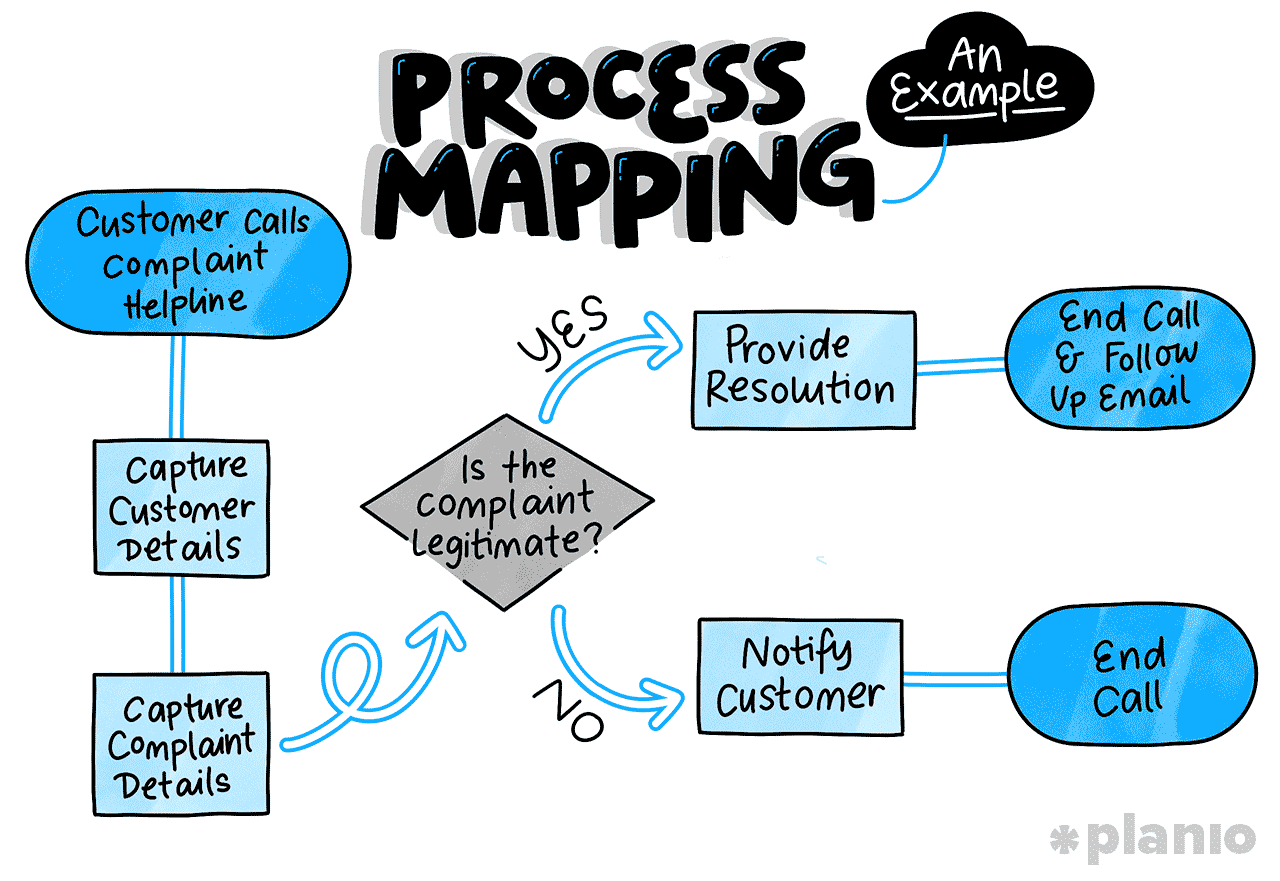
Effective mapping begins with selecting a high-impact workflow and assembling cross-functional participants who perform the work daily. Their firsthand knowledge ensures that the map reflects reality rather than policy. Mapping should capture triggers, inputs, decision points, handoffs, tools used, and outputs across the entire lifecycle of the workflow.

A well-constructed workflow map should clearly illustrate:

  • The trigger that initiates the workflow
  • Key activities and decision points along the path
  • Handoffs between roles, teams, or systems
  • Tools or platforms used at each stage
  • Outputs and downstream dependencies

This level of visibility ensures the map reflects operational reality rather than theoretical design.

Choosing the Right Level of Detail in Workflow Mapping

One of the most common challenges in workflow mapping is determining the appropriate level of detail. Maps that are too high-level fail to reveal operational friction, while overly detailed maps become difficult to interpret and maintain.

“The right balance focuses on decisions, handoffs, and delays. These elements typically account for the majority of inefficiency and risk within workflows,” explains Dana Ronald, CEO of Tax Crisis Institute. Routine tasks can often be grouped, while exceptions and approvals should be explicitly documented.

Importantly, workflow maps should be treated as living artifacts. As processes evolve, maps must be updated to remain relevant. Maintaining this discipline ensures that mapping remains a practical tool rather than a one-time exercise.

Common Pitfalls in Workflow Mapping

Organizations often undermine mapping efforts through narrow or siloed approaches. Mapping within a single department rarely captures end-to-end complexity, particularly for workflows that span multiple teams.

Another pitfall is treating mapping as a compliance exercise rather than a diagnostic one. When participants feel pressure to present workflows in a favorable light, critical issues remain hidden. Psychological safety and leadership support are essential for honest documentation.

Finally, mapping without intent leads to stagnation. Workflow maps should exist to inform measurement and improvement. Without clear next steps, even the most accurate maps fail to deliver value.

The Role of Cross-Functional Collaboration in Workflow Design

“Because core workflows span multiple teams, no single function has complete ownership of how they operate. Sales may initiate a workflow, operations may execute it, finance may validate it, and customer support may deal with the consequences when it breaks down,” explains Beni Avni, founder of New York Gates.

Effective workflow design, therefore, requires deliberate cross-functional collaboration. Mapping and redesign sessions should include representatives from every stage of the workflow, ensuring that decisions reflect end-to-end realities rather than local optimization.

This collaborative approach also builds shared accountability. When teams understand how their actions affect downstream outcomes, friction decreases and cooperation improves. Over time, this shared ownership becomes a powerful driver of operational maturity.

Measuring Workflow Performance: From Activity to Outcomes

Mapping provides visibility; measurement provides insight. Once workflows are clearly defined, organizations can evaluate how effectively they perform. Measurement shifts conversations from anecdotal frustration to objective analysis.
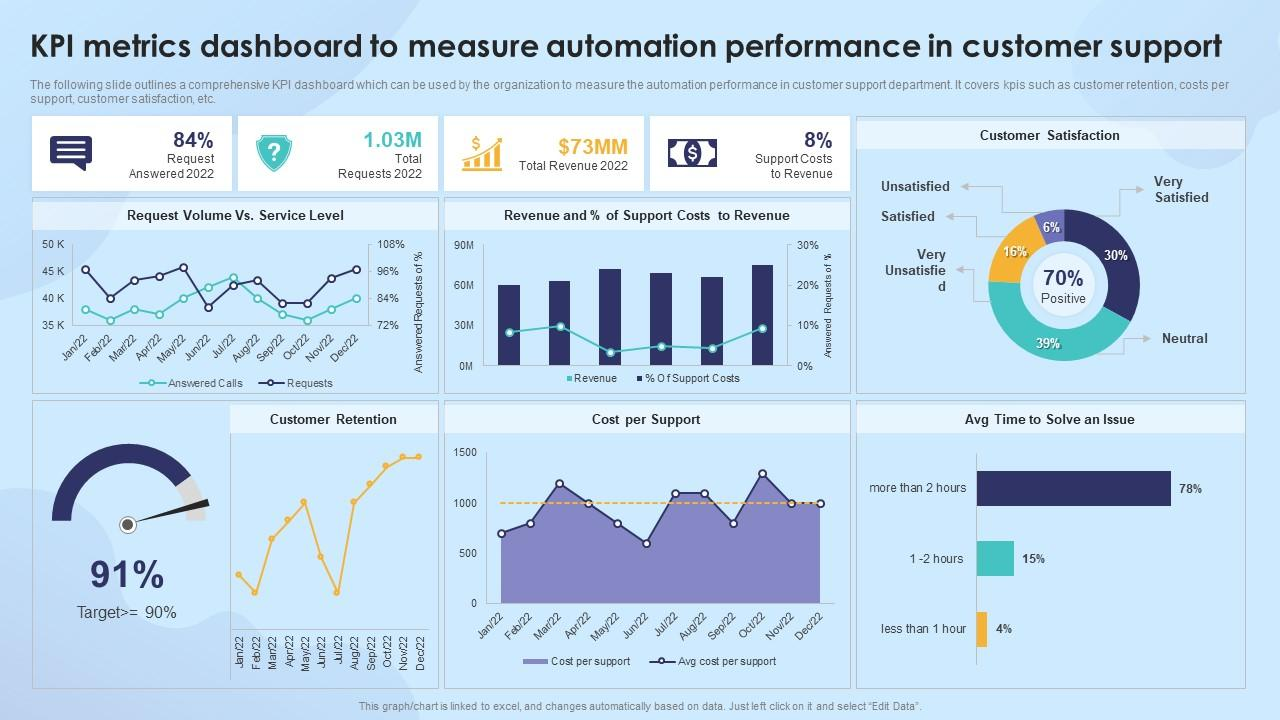
Common indicators used to assess workflow performance include:

  • End-to-end cycle time
  • Error or defect rates
  • Rework frequency
  • Cost per transaction or case
  • Customer or internal stakeholder satisfaction

Establishing baseline performance is essential. Baselines provide context for improvement efforts and prevent misinterpretation of results. Without them, it becomes difficult to determine whether changes represent real improvement or simply shift work elsewhere.

Linking Workflow Metrics to Business Performance

“Workflow metrics create real value only when they are directly connected to broader business outcomes. On their own, indicators such as cycle time, error rates, or throughput provide limited insight,” explains Tom Bukevicius, Principal at Scube Marketing. Their importance becomes clear when leaders understand how changes in these metrics affect revenue, cost structure, risk exposure, and customer experience.

For example, faster cycle times can improve cash flow by accelerating revenue recognition, while reduced error rates may lower compliance risk, rework, and operational cost. When these connections are explicit, workflow performance moves from an operational concern to a strategic lever.

This linkage also enables better prioritization. Not all workflows deserve equal attention or investment. Metrics help leaders identify which workflows have the greatest impact on business performance and where improvement efforts will deliver the highest return.

In practice, effective organizations use workflow metrics to:

  • Connect operational performance to financial outcomes such as revenue, margin, and cash flow
  • Identify workflows that directly influence customer satisfaction and retention
  • Assess risk exposure related to compliance, quality, or service reliability
  • Compare improvement opportunities based on strategic impact rather than local efficiency

By aligning workflow metrics with organizational goals, measurement becomes a decision-making tool rather than an operational afterthought. Leaders gain a clearer basis for investment, teams understand why improvements matter, and optimization efforts remain focused on outcomes that drive long-term performance.

Identifying Bottlenecks and Root Causes

Performance data often reveals patterns: consistent delays at certain steps, recurring errors after specific handoffs, or uneven workloads across roles. These patterns point to bottlenecks—constraints that limit overall workflow performance.

However, addressing bottlenecks requires understanding root causes. Delays may stem from unclear decision authority, mismatched capacity, or outdated systems rather than individual behavior. Root cause analysis techniques help uncover these structural issues.
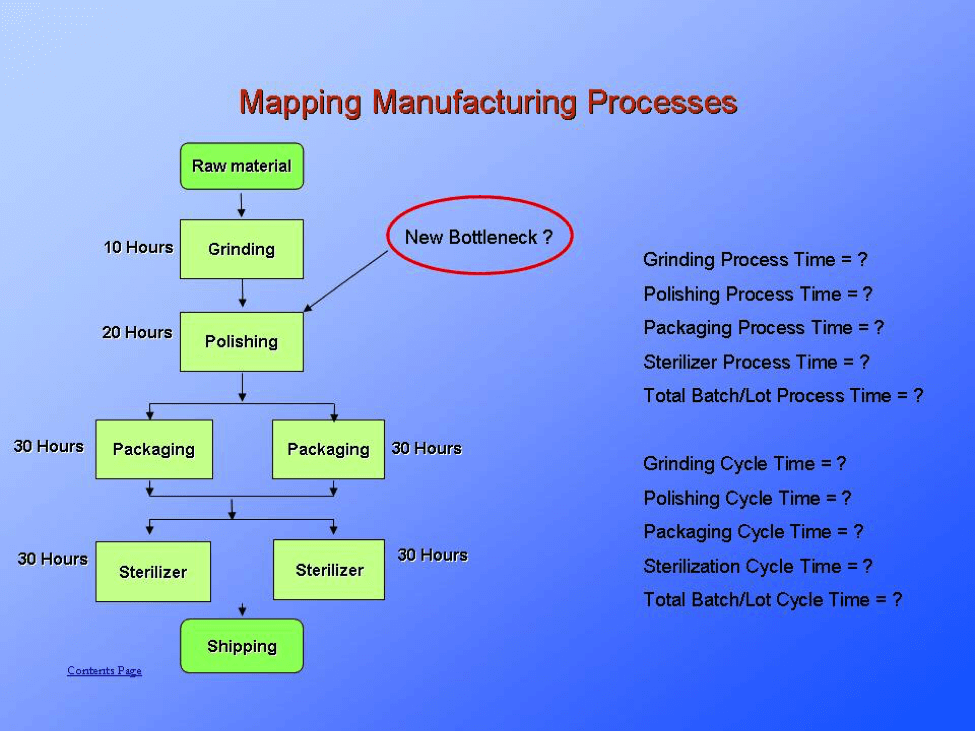
“Focusing on root causes ensures that improvements address underlying constraints rather than temporary symptoms, leading to more durable performance gains,” says Julia Rueschemeyer, Attorney at Amherst Divorce.

Improving Workflows: Designing for Flow and Simplicity

Effective workflow improvement prioritizes flow—the smooth progression of work from start to finish with minimal interruption. This typically involves eliminating non-value-adding activities, clarifying ownership, and reducing unnecessary variation.

In practice, effective workflow improvements often involve:

  • Removing redundant approvals and reviews
  • Clarifying ownership at each stage of the process
  • Reducing unnecessary handoffs
  • Standardizing core steps while managing exceptions deliberately

These changes improve speed and reliability without introducing excessive control or rigidity.

Balancing Control and Flexibility in Workflow Design

One of the most difficult challenges in workflow optimization is finding the right balance between control and flexibility. Too much control leads to rigidity, slow decision-making, and disengaged teams. Too much flexibility results in inconsistency, risk exposure, and unpredictable outcomes.

Well-designed workflows establish clear standards for common scenarios while allowing defined exceptions for edge cases. This approach preserves speed without sacrificing governance. Decision rights should be explicit, and escalation paths should be simple and visible.

By designing workflows that are structured but adaptable, organizations can respond to change without constantly redesigning their operating model.

Managing Change and Adoption During Workflow Improvements

Even the most thoughtfully designed workflows fail if they are not adopted in practice. Change management is therefore not a supporting activity, but a core component of any workflow improvement effort. When teams do not understand the purpose behind changes, new workflows are often perceived as additional bureaucracy rather than performance enablers.

“Successful adoption begins with context. Teams must clearly understand why a workflow is changing, what problems the change is intended to solve, and how it improves outcomes for both the organization and the individuals doing the work,” says Tal Holtzer, CEO of VPSServer. Without this shared understanding, resistance tends to surface in subtle ways—workarounds, partial compliance, or reversion to old habits.

Clear communication, practical training, and phased implementation significantly reduce disruption. Rather than introducing sweeping changes all at once, effective organizations sequence improvements, allowing teams to build confidence and capability over time. This approach also makes it easier to identify unintended consequences early and adjust before issues scale.

In practice, strong adoption efforts typically include:

  • Clear articulation of the business rationale behind workflow changes
  • Role-specific training focused on real work scenarios
  • Phased rollouts that limit operational risk and disruption
  • Feedback channels that allow teams to raise issues and suggest refinements
  • Visible leadership support that reinforces the importance of the new workflow

When adoption is treated as part of the workflow design process—not an afterthought—teams are more likely to engage constructively with change. Over time, workflows shift from being perceived as imposed structures to becoming shared enablers of performance, alignment, and accountability across the organization.

The Role of Technology in Workflow Improvement

Technology can significantly improve workflow performance, but only when applied with intent. Introducing automation before understanding and simplifying a process often accelerates inefficiencies rather than resolving them. Technology should reinforce well-designed workflows, not compensate for unclear ones.

Automation and Operational Efficiency

Automation delivers the most value when applied to repetitive, rule-based tasks that require consistency rather than judgment. Activities such as data synchronization, notifications, and basic validations can be automated to reduce manual effort and error rates. This allows teams to focus on higher-value work such as analysis, decision-making, and customer engagement.

Visibility, Measurement, and Decision Support

Beyond automation, technology enables real-time visibility into workflow performance. Dashboards and alerts help leaders monitor cycle times, bottlenecks, and exceptions as they occur. However, visibility must be purposeful. Tracking too many metrics creates noise and slows decision-making. Effective systems surface only the information needed to support timely, accountable action.

When used deliberately, technology strengthens execution and scalability. When applied without clarity, it adds complexity and obscures the problems it is meant to solve.

Sustaining Improvement Through Governance and Ownership

Workflow optimization is not a one-time initiative or a transformation project with a fixed end date. As organizations grow, enter new markets, adopt new technologies, or respond to regulatory change, workflows must continuously evolve. Without deliberate governance, even well-designed processes gradually degrade as exceptions accumulate and informal workarounds take hold.

Sustaining improvement requires clear ownership. Each core workflow should have a designated owner with end-to-end accountability for performance, documentation, and ongoing refinement. This role ensures that workflows are managed as systems rather than collections of disconnected tasks, and that changes are evaluated based on their impact across teams.

Regular, structured reviews play a critical role in preventing drift. These reviews assess performance trends, emerging bottlenecks, and alignment with strategic priorities. When conducted consistently, they help organizations identify issues early and make incremental adjustments before problems become systemic.

Equally important is cultural reinforcement. When workflow thinking is embedded into how teams plan, execute, and evaluate work, optimization becomes a shared responsibility rather than a centralized effort. Over time, this mindset shifts workflow improvement from a periodic initiative into a durable organizational capability—one that supports resilience, scalability, and long-term performance.

Using Workflow Insights to Drive Continuous Improvement

Workflow optimization should not end once initial improvements are implemented. The most effective organizations treat workflow data as a continuous source of insight rather than a one-time diagnostic tool.

Performance trends, exception rates, and cycle-time fluctuations often signal emerging issues before they become visible problems. Regularly reviewing these signals enables teams to make small, incremental adjustments that prevent larger disruptions.

Over time, this feedback-driven approach shifts workflow improvement from reactive problem-solving to proactive performance management—embedding continuous improvement into daily operations rather than periodic transformation projects.

Aligning Workflows With Strategic Objectives

Optimized workflows must directly support an organization’s strategic intent. A growth-focused strategy may require workflows that prioritize speed, scalability, and responsiveness, while a compliance-driven strategy may emphasize control, traceability, and risk management. Without deliberate alignment, even well-optimized workflows can pull the organization in the wrong direction.

Alignment begins by translating high-level strategic goals into clear operational requirements. Leaders must ask how strategy should influence day-to-day execution—what behaviors workflows should encourage, what outcomes they must consistently deliver, and where trade-offs are acceptable. When these requirements are explicit, workflow improvements reinforce long-term objectives rather than unintentionally undermining them.

End-to-end thinking is essential to maintaining this alignment. Optimizing individual steps or departments in isolation often creates downstream inefficiencies, shifting cost or complexity rather than eliminating it. Viewing workflows as integrated systems ensures that local improvements contribute to overall performance, customer experience, and strategic outcomes.

When workflows are continuously evaluated through a strategic lens, they become more than operational mechanisms. They serve as practical expressions of strategy—guiding execution, enabling consistency, and helping the organization adapt without losing focus.

Conclusion

Mapping, measuring, and improving core business workflows is not about incremental efficiency alone; it is about building the operational foundation for sustainable performance. Clear workflows reduce friction, improve decision-making, and enable consistent execution in complex environments.

Organizations that treat workflows as strategic assets gain visibility, alignment, and resilience. Measurement transforms intuition into insight, while disciplined improvement ensures that daily operations support long-term goals.

In an era defined by constant change, the ability to understand and refine how work flows is a decisive advantage. Businesses that invest in this capability position themselves to adapt, scale, and compete with confidence.


How Reducing CBM Can Dramatically Lower Your Import Cost

Importing goods can be an excellent business opportunity. But transportation costs can significantly reduce your profitability. Beginners greatly focus on the weight of the goods they import. Frequent mistakes occur because of this. Your cargo size might be more important than your weight. As far as shipping goes, it’s measured by size in Cubic Meters, or CBM. So if you’re shipping boxes that are too large, you have to pay for shipping “air.” That’s because you’re paying for shipping space that doesn’t have anything inside. By learning ways to lower your own CBM, you would be able to save money. Below is a guide on how it should be done.

What is CBM?

CBM stands for Cubic Meter. It is a universal measurement for volume that is commonly used in international freight. A CBM can be conceptualized as a unit block of space. It measures one meter wide, one meter long, and one meter high. When you transport goods by air or ship, what you are buying from the shipping line is space. The shipping line has to know how much space your cargo occupies in the container. The more space you use, the more you pay.

It becomes even more important if you are shipping “LCL” (Less than Container Load). You are sharing a container with other people. You pay directly for every cubic meter you use.

Connection Between CBM and Cost

Shipping carriers have a specific formula they use to calculate your price. They check two things:

  1. Actual Weight: The weight of the cargo.
  2. Volumetric Weight: The weight based on occupied space (CBM).

They will always charge you for either number, whichever is higher. This charge is known as “Chargeable Weight.” For instance, let us assume you are shipping pillows. Pillows are very light, but they are large and puffy. A pillow occupies a large amount of space. The ship captain will not be interested, that your pillows are light. The ship captain will be concerned about your pillows taking up space in his container. He will charge you on a volume basis (CBM), and not on weight.

So, if you can force your pillows into a smaller box, your CBM will reduce. So, your freight cost will reduce immediately.

Calculating Cost per Cubic Meter

It should be remembered that to be able to control your costs, it is necessary that you learn how to measure your merchandise. You should do so even before you make an order.

Now, here is a simple formula to calculate CBM (Cubic Meter) for shipping:

Length x Width x Height = CBM

(Note: You must use meters for this calculation, not centimeters or inches.)

Step-by-Step Calculation Example

Let’s say you are importing 100 cartons of shoes.

One carton has these dimensions:

Length: 50 cm (0.5 meters)

Width: 40 cm (0.4 meters)

Height: 20 cm (0.2 meters)

Step 1: Calculate CBM for one carton.

0.5 x 0.4 x 0.2 = 0.04 CBM

Step 2: Calculate total CBM for the shipment.

You have 100 cartons.

0.04 CBM x 100 cartons = 4 total CBM

Now you know you need to pay for 4 cubic meters of space. If you can lower this number, you can save money.

Practical Strategies to Reduce CBM

Reducing CBM is not magic; it calls for planning and smart packaging. The following are some of the best ways to lower your CBM:

1. Vacuum Packing

This works out great for soft goods. Items like clothing, bedding, and plush toys have a lot of air in them.

You can utilize those vacuum-sealed bags to suck the air out. It compresses the product. A fluffy jacket may actually go down to half its size. This can reduce your overall CBM by up to 50% or more. You are no longer paying to ship air.

2. Nesting Products

“Nesting” refers to putting one thing inside another. Consider Russian nesting dolls or plastic cups. If you import chairs, do not ship them fully assembled. Stack the seats on top of each other. If you import luggage, put the small suitcase inside the medium one. Then put the medium one inside the large one.

This method makes use of the space available within the product itself. It reduces the volume drastically without changing the count of the product.

3. Knock-Down Design

Most of the time, the furniture is the biggest culprit for high CBM. Shipping a fully assembled table is expensive. The space under the table is wasted.

Ask your supplier for “Knock-Down” designs. This simply means the item comes in pieces. Legs are removed and laid flat against the table top. The customer assembles it at home.

Flat boxes stack easily. They take up much less room than assembled furniture. IKEA is famous for this because it saves them millions in shipping.

4. Enhancing the Design of Carton

Sometimes the product is small, and the box is huge. Many suppliers use a standard box they may have lying around, and that box could be too big for your particular item.

Ask your supplier to use “tight-fitting” packaging. There should not be any empty gaps inside the master carton.

Also, avoid oddly shaped boxes. Perfect squares or rectangles stack the best. Odd shapes create “dead space” that you cannot use, but you still pay for.

5. Repackaging Before Shipping

Sometimes suppliers will package 10 items in a box that could hold 20. This doubles the number of boxes you need. Review the “packing list” before the goods leave the factory. Ask the supplier to optimize the packing. If they can safely fit more items into one master carton, your total CBM will drop.

Pallets and Their Effects on CBM

Importers make use of pallets for packaging. Pallets are very useful for safety. Pallets increase loading and unloading times. But they also increase your CBM.

A standard pallet will take up floor space. It will also increase your height. All these volumes will be chargeable.

You might be shipping Loose-Cube-Cartons (LCL). In that case, ask yourself if you need pallets.

  • Loose Cartons: You will be charged for the volume occupied by the boxes. It costs the least.
  • Palletized: Cost of boxes and volume on pallet.

It should be a tough product. Consider floor loading (packing boxes on the container floor). It will eliminate the volume occupied by pallets. Also, if you have no alternative but to use pallets, your boxes should fit perfectly inside the pallet without any gaps.

A Real-World Savings Example

A sample will be given so we can examine and calculate savings.

Option A (Poor Packaging):

You import 500 plastic chairs. The chairs have been assembled.

  • A chair requires 0.4 CBM.
  • Total Volume: 200 CBM.
  • You will need approximately three 40-foot containers.
  • Cost: Expensive ($$$)

Option B (Optimized Packaging):

You would like the supplier to stack the chairs. You can then stack 10 chairs on top of each other.

A stack of 10 chairs occupies 1.0 CBM.

  • Total stacks required: 50.
  • Total Volume: 50 CBM.
  • You can squeeze everything into a single 40-foot container.
  • Cost: LOW ($).

By stacking your product, you were able to reduce shipping costs by more than 60%.

Conclusion

Transport cost constitutes a large percentage of your expenditure. You cannot control the price of fuel and transport rates, but you have control over CBM for shipping. Reducing the cost and burden of CBM is one of the brightest ways to cut down on your import costs. It doesn’t need any expertise. It just needs your detail orientation. Always size before you buy. Talk it over with your packaging source. Ask if it can be broken down, nested, or compacted. Every cubic centimeter you eliminate puts more money in your pocket. Begin today using the equation to determine your CBM value for shipping. You will be amazed at the savings you will make on your next shipping.